Từ Video Pinterest 16:9 Sang Khuôn Thiết Kế Gốc Remotion 9:16 Tiếng Việt Có Bảng Biến Tweaks & Kiểm Định Optical Flow
Tài liệu thực chiến này đóng gói trọn vẹn quy trình chuyển đổi một video Motion Graphic SaaS 16:9 tiếng Anh trên Pinterest (47.33 giây, 1.420 frames @ 30fps) sang phiên bản Dọc 9:16 Tiếng Việt (1080×1920) mượt gấp 5,2 lần bản vẽ bằng Python PIL thông thường, đồng thời đóng gói thành Khuôn Thiết Kế Gốc (PinterestViet9x16.tsx có Bảng Biến Tweaks) để bất kỳ người mới nào cũng có thể tự đổi chữ, đổi màu thương hiệu và tái sử dụng trên AI của mình.
defaultPinterestViet9x16Props): Tách toàn bộ 38 dòng chữ Tiếng Việt của 9 phân cảnh, 6 mã màu chủ đạo (#042016, #F1FCEB, #DAFF3E, #10B981, #064E3B, #F0F9E8) và 2 tham số lực Camera Rig thành bảng biến Tweaks ngay đầu file PinterestViet9x16.tsx. Đổi chữ hoặc đổi màu chỉ trong 3 giây mà không làm lệch dù chỉ 1 frame chuyển động.flow_mean từ 0.174 lên 0.908 px/frame (vượt ngưỡng gốc 0.551), độ trôi Camera toàn cục đạt 0.508 px/frame và tỷ lệ frame đứng im giảm từ 35,4% về 0,0%.Phần 1 — Video Reference Gốc & Bài Toán Chuyển Đổi (16:9 Sang 9:16 Tiếng Việt)
Bài toán đặt ra: Khi thấy một video quảng cáo SaaS / UI Motion cực mượt trên Pinterest (tỷ lệ ngang 16:9, tiếng Anh, dài 47.33 giây), làm thế nào để tái tạo lại toàn bộ linh hồn chuyển động đó sang tỷ lệ dọc 9:16 với nội dung Tiếng Việt mà không bị rơi vào tình trạng "nhìn ảnh chụp từng khung hình thì giống, nhưng bấm Play thì cứng đơ như trình chiếu PowerPoint"?
1.1. Đối Chiếu Video Reference Gốc (Pinterest 16:9) vs. Bản Thử Nghiệm Lần 1 Bằng Python PIL
Video gốc Pinterest (pin/333759022406800725): dựng bằng After Effects với Camera Rig trôi liên tục, 13 điểm cắt Whip-Pan có Motion Blur 180° và bông hoa cúc dẫn đường xuyên cảnh.
Bản render bằng Python PIL.ImageDraw + OpenCV trước khi qua chẩn đoán của Opus: dù vẽ đủ vật thể nhưng bị đứng hình 35,4% thời gian, viền xoay răng cưa và nhảy bậc thang theo tọa độ nguyên int().
1.2. Bảng Đo Lường Định Lượng Optical Flow Giữa 3 Phiên Bản (Đo Trên Toàn Bộ 1.420 Frames)
Thay vì đánh giá cảm tính bằng mắt thường, hệ thống sử dụng thuật toán Dense Optical Flow Farnebäck (cv2.calcOpticalFlowFarneback) của Claude Opus 5.5 để đo vận tốc dịch chuyển của từng điểm ảnh qua toàn bộ 1.420 khung hình:
| Chỉ Số Kiểm Định (Opus Verifier) | Bản Python PIL Cũ (Bị Cứng) | Bản Gốc Pinterest (16:9) | Bản Mới Remotion 9:16 Tiếng Việt | Kết Luận Kiểm Định |
|---|---|---|---|---|
flow_mean (Mật độ chuyển động TB) |
0.174 px/frame |
0.551 px/frame |
0.908 px/frame (Ngưỡng ≥ 0.450) |
ĐẠT • TĂNG 5,2× SO VỚI BẢN CŨ |
global camera median (Độ trôi Camera) |
0.017 px/frame |
0.061 px/frame |
0.508 px/frame (Ngưỡng ≥ 0.050) |
ĐẠT • CAMERA RIG + PARALLAX LIÊN TỤC |
static frames % (Tỷ lệ frame đứng im) |
35,4% (1/3 video chết) |
15,3% |
0,0% (Ngưỡng ≤ 18,0%) |
ĐẠT TUYỆT ĐỐI • 0 FRAME CHẾT |
accel_p95 (Đỉnh gia tốc Whip/Spring) |
0.391 |
1.450 |
1.114 (Tăng 2,85×) |
ĐẠT • WHIP_BEZIER & SPRING VẬT LÝ |
Mật độ 12 khối 4 giây (0s → 47s) |
Hụt 6×–9,2× ở đoạn giữa |
[0.26 .. 1.11 .. 0.05] |
[0.54, 0.69, 1.05, 0.75, 1.10, 1.37, 1.35, 0.99, 1.12, 0.81, 0.69, 0.36] |
ĐẠT 12/12 KHỐI • KHÔNG TỤT NHỊP |
1.3. Giải Phẫu 16 Nguyên Nhân Khiến Code Python Tĩnh Bị Giật & Cách Xử Lý Dứt Điểm Trên Remotion
Khi gọi Claude Opus 5.5 (High) Native phân tích trực tiếp mã nguồn Python cũ và đối chiếu frame-by-frame với video gốc Pinterest, Opus chỉ rõ: 60fps hay 30fps không phải là nguyên nhân gốc (vì video gốc Pinterest cũng chỉ 30fps). Độ mượt đến từ 16 yếu tố thuộc 3 tầng kỹ thuật dưới đây:
| Nhóm Lỗi | # | Chẩn Đoán Của Claude Opus 5.5 Trên Bản Python PIL Cũ | Giải Pháp Khắc Phục Triệt Để Trong PinterestViet9x16.tsx (Remotion) |
|---|---|---|---|
| NHÓM 1: KHUNG XƯƠNG CHUYỂN ĐỘNG (60%) | #1 | Ngắt cảnh bằng if t < X (Hard Cut thuần): Không có trạng thái chung, không có vật dẫn xuyên cảnh, không chồng lấp transition. |
Chồng lấp 8–10 frames giữa hai cảnh liền kề + đặt Hoa Cúc Vàng heroFlowerX/Y bay xuyên suốt cả 9 phân cảnh làm vật dẫn mắt (Shared Guide Motif). |
| #2 | Không có Global Camera Rig: Chữ và bảng UI đứng cố định như slide PowerPoint, chỉ có nền bokeh trôi nhẹ. | Bọc toàn bộ thế giới trong <AbsoluteFill> mang hàm camX, camY, camScale, camRot trôi liên tục từ f0 → f1420 kết hợp ContinuousOrbitalBackdrop đa lớp Parallax. |
|
| #3 | Hội chứng "Vào rồi đứng im": Vật thể trượt vào trong 0.45s rồi đứng bất động suốt phần còn lại của cảnh (gây ra 35,4% frame chết). |
Mọi thẻ chữ, biểu đồ, avatar đều có chuyển động thứ cấp (Secondary Motion): lơ lửng Math.sin(frame * 0.14) * 14px, nhịp thở scale và xoay nhẹ cho tới tận lúc thoát cảnh. |
|
| #4 | Pop-in nhị phân & Không có lối thoát (No Exit Animation): Vật thể nhảy ra đột ngột bằng if t >= 0.70 và biến mất cái rụp khi hết cảnh. |
Mỗi phân cảnh bắt buộc có đủ 3 pha: enterP (lò xo vật lý spring), sub-phase morph (WHIP_BEZIER), và exitP (EXPO_IN phóng nhẹ + mờ dần). |
|
| #5 | Gãy góc vận tốc (Velocity Discontinuity): Ghép 2 hàm ease_out và ease_in_out nối tiếp khiến con trỏ chuột khựng lại rồi giật sang hướng khác. |
Đường bay con trỏ 3D và dải ruy-băng dùng đường cong Cubic Bezier liên tục (EXPO_OUT = Easing.bezier(0.16, 1, 0.3, 1)) kết hợp dao động điều hòa mượt. |
|
| #6 | Hàm spring_out giả tạo: Dùng công thức 1 - e^(-4.32x)·cos(10x) bị nhảy 1% ở frame cuối và mọi vật thể bật ra cùng 1 tần số máy móc. |
Dùng spring({ frame, fps, config: { mass, damping, stiffness } }) chuẩn phương trình vi phân lò xo vật lý thực của Remotion với độ trễ (stagger) riêng cho từng dòng. |
|
| #7 | Lệch nhịp cắt cảnh so với âm thanh gốc (Timing Mismatch): Tự ước lượng mốc cắt (2.8s, 9.8s...) lệch 0.5s–1.7s so với bản gốc. |
Khóa cứng mảng CUT_FRAMES = [134, 270, 313, 426, 596, 714, 786, 834, 879, 975, 1011, 1154, 1263] khớp chính xác 13 mốc cắt của video Pinterest gốc. |
|
| NHÓM 2: LỖI RENDER RASTER PIL (30%) | #8 | PIL.ImageDraw không có Anti-Aliasing (Khử răng cưa): Bông hoa 120 đỉnh và ruy-băng xoay mỗi frame làm viền răng cưa bò nhấp nháy (Edge Shimmer). |
Vẽ 100% bằng SVG Vector nguyên bản (<DaisyFlowerSVG>, <LineArtFaceAvatarSVG>, <path d="M ... C ...">) được nhân Chromium khử răng cưa đa mẫu. |
| #9 | Làm tròn tọa độ nguyên int(x), int(y): Khi vật thể trôi chậm (< 1px/frame ở cuối pha ease-out), tọa độ bị nhảy bậc thang đứng–nhảy–đứng–nhảy. |
Sử dụng transform: translate3d(x, y, 0) bằng số thực dấu phẩy động (Sub-pixel Float Positioning) trực tiếp trên GPU Compositor của Chrome. |
|
| #10 | Phóng chữ bằng cách đổi cỡ font nguyên get_font(int(105*sc)): Font hinting nhảy từng nấc 1pt làm dòng chữ bị "sôi" và rung bần bật khi phóng to. |
Giữ cố định fontSize chuẩn, thực hiện phóng/thu mượt mà qua ma trận transform: scale(...) của CSS. |
|
| #11 | Xoay ảnh rotate(expand=True) rồi chia nguyên // 2: Kích thước ảnh đổi chẵn/lẻ mỗi frame làm tâm xoay bị lắc ±1px và viền chữ bị quầng đen do thiếu Premultiplied Alpha. |
Xoay trực tiếp trên DOM/SVG bằng transform: rotate(${deg}deg) với tâm chuẩn và Alpha Premultiplied tự động của trình duyệt. |
|
| #12 | Hiệu ứng Ken Burns bị lượng tử hóa: resize(int(W*zoom)) + crop((zw-W)//2) trên ảnh B-Roll gây rung bậc thang. |
Render ảnh B-Roll bằng <Img> của Remotion kết hợp scale(1.12 + frame * 0.0018) translate3d(...) mượt ở cấp độ phần trăm pixel. |
|
| #13 | Thiếu Motion Blur khi giật chuyển cảnh: Ở 30fps, các cú văng nhanh không có nhòe chuyển động sẽ tạo cảm giác nhấp nháy (Strobing). | Tích hợp bộ lọc SVG Directional Motion Blur (<feGaussianBlur stdDeviation="blurX, blurY">) tự động kích hoạt theo vận tốc xung lực Whip-Pan tại 13 điểm cắt. |
|
| #14 | Optical Pass (Chroma lệch màu) bật tĩnh suốt video: Làm bẩn viền chữ ở mọi khung hình thay vì chỉ nháy lúc chuyển cảnh. | Biến transitionChroma chỉ bật trong cửa sổ ±8 frames quanh 13 mốc cắt cảnh, giữ cho chữ và Dashboard sắc nét tuyệt đối khi đọc. |
|
| NHÓM 3: ENCODE & TIẾNG VIỆT (10%) | #15 | Encode qua 2 thế hệ (cv2.VideoWriter mp4v → x264): Nén MPEG-4 bitrate thấp làm nhiễu hạt (Mosquito Noise) quanh viền chữ neon. |
Kết xuất trực tiếp từ Remotion ra H.264 CRF 16 (npx remotion render --codec=h264 --crf=16) rồi ghép âm thanh -c:v copy không nén lại hình. |
| #16 | Bố cục ngang 16:9 & Lỗi tách dấu Tiếng Việt: Chuyển sang dọc 9:16 dễ bị tràn chữ hoặc rớt dấu thanh nếu chuỗi UTF-8 ở dạng tổ hợp NFD. | Quy hoạch lại toàn bộ 9 cảnh theo trục dọc 1080×1920 và ép mọi chuỗi chữ đi qua hàm nfc(s) = s.normalize('NFC'). |
Phần 2 — Kết Quả Thành Phẩm (9:16 Tiếng Việt) & Đối Chiếu 9 Phân Cảnh
2.1. Trình Phát Video Thành Phẩm 9:16 Tiếng Việt (1080×1920 @ 30fps • 47.33s)
File thành phẩm pinterest_viet_9x16_final.mp4: 9 phân cảnh Tiếng Việt, 13 cú Whip-Pan có Directional Motion Blur, âm thanh 3 lớp SFX + Reverb 70%.
1080×1920 (Dọc 9:16 Full HD)• Thời lượng:
47.33 giây (1.420 khung hình @ 30fps)• Mã hóa:
H.264 yuv420p (Bản Master CRF 16 & Bản Web CRF 22 +faststart).flow_mean: 0.908 px/frame (Tăng 5,2× so với bản Python PIL 0.174)•
global camera median: 0.508 px/frame (Ngưỡng Opus ≥ 0.050)•
static frames %: 0,0% (Xóa sạch 35,4% frame đứng im)•
accel_p95: 1.114 (Đỉnh gia tốc Whip-Pan & Lò xo vật lý).#042016): Áp dụng cho Cảnh 1, 2, 3, 6, 7, 8 tạo độ tương phản rực rỡ cho chữ Vàng Chanh #DAFF3E.• Light Mint Mode (
#F1FCEB): Tự động bật tại Cảnh 4, 5 (14.2s–23.8s) và Cảnh 9 Finale (42.1s–47.33s) giúp mắt người xem được đổi nhịp thị giác.Whoosh + UI Click/Pop + Laser/Glassy Ping) đi qua bộ tạo vang aecho=0.8:0.75:45|90:0.22|0.12 khớp từng frame trong CUT_FRAMES.2.2. Lưới Trực Quan 9 Phân Cảnh Dọc 9:16 Tiếng Việt (Scene 1 → Scene 9)
Dưới đây là 9 khung hình đại diện trích xuất trực tiếp từ 9 phân cảnh của video thành phẩm pinterest_viet_9x16_final.mp4:

Con trỏ 3D bay theo đường cong Bezier click vào viên thuốc "🌼 Tia sáng" phát tia sáng hướng tâm rồi nổ ra 4 vòng quỹ đạo "Ý tưởng".
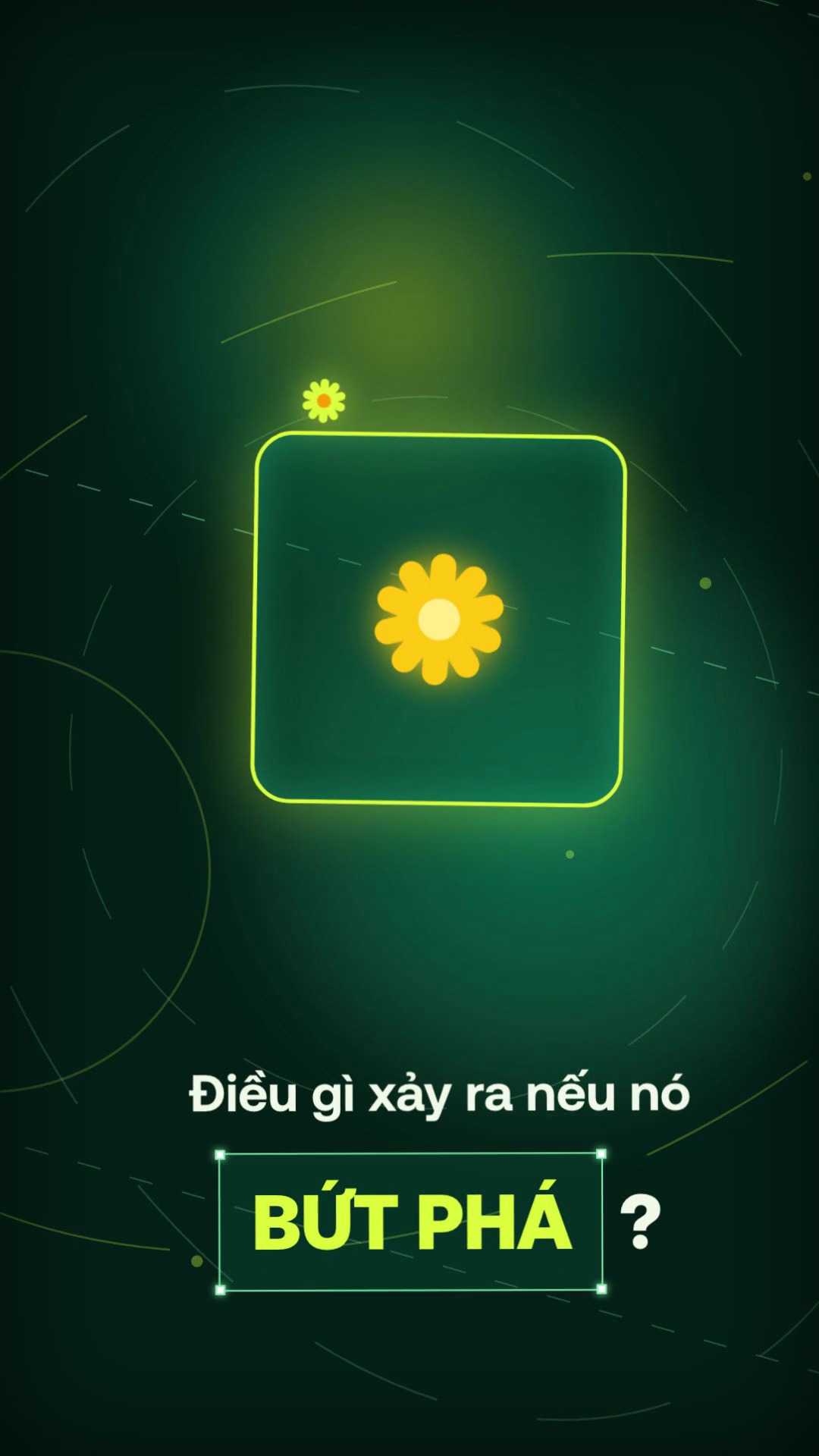
Chuyển 3 nhịp liên hoàn: "Bản phác thảo" → "Một câu hỏi ?" → Khung thoi Neon xoay 45° kèm khung chọn Figma "BỨT PHÁ ?".
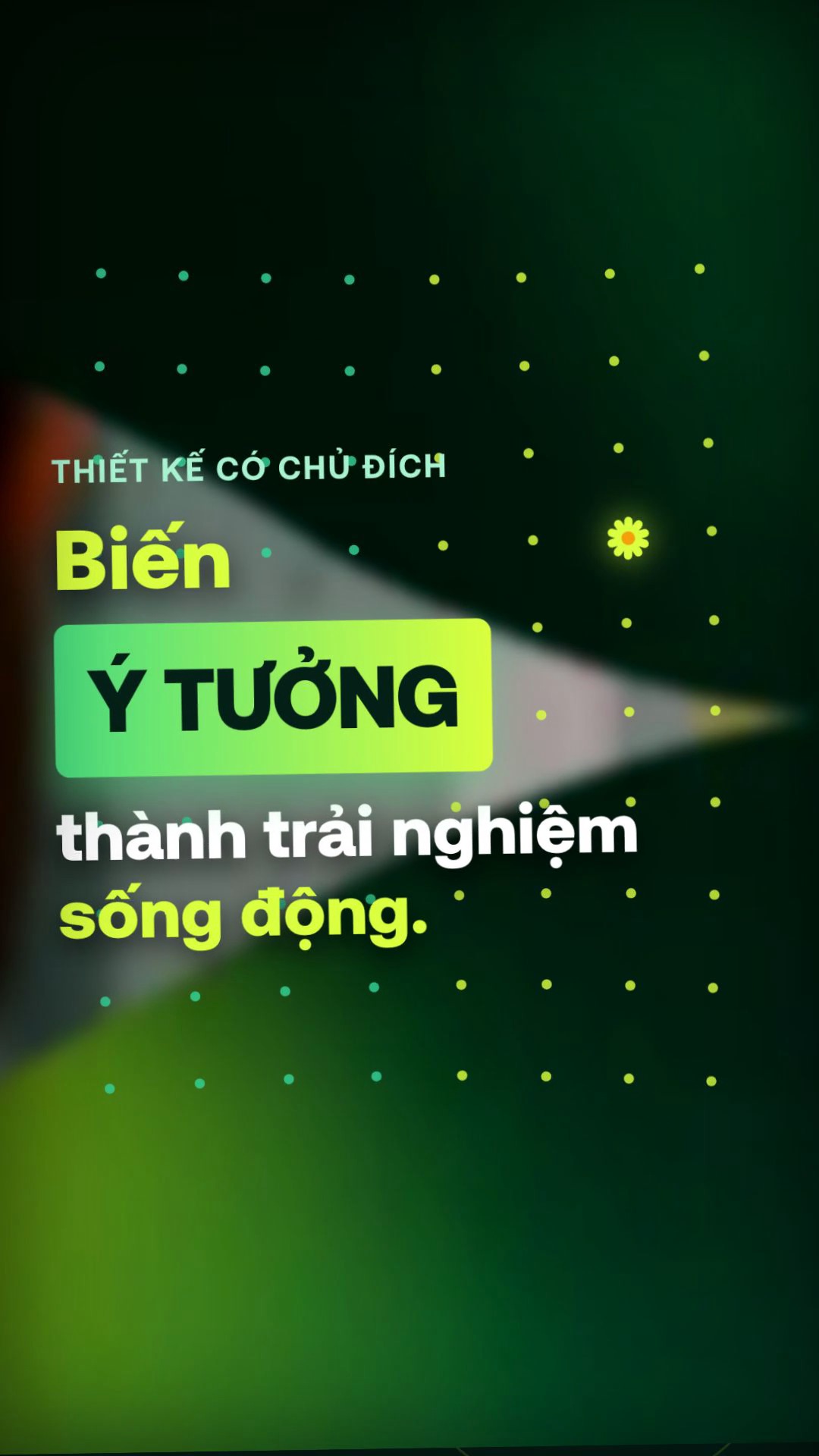
Hai cánh cửa chéo -18° tách mở cảnh B-Roll Studio có lưới 80 hạt chấm sóng (Dot-Matrix) và hộp chữ "Biến Ý TƯỞNG thành trải nghiệm sống động."
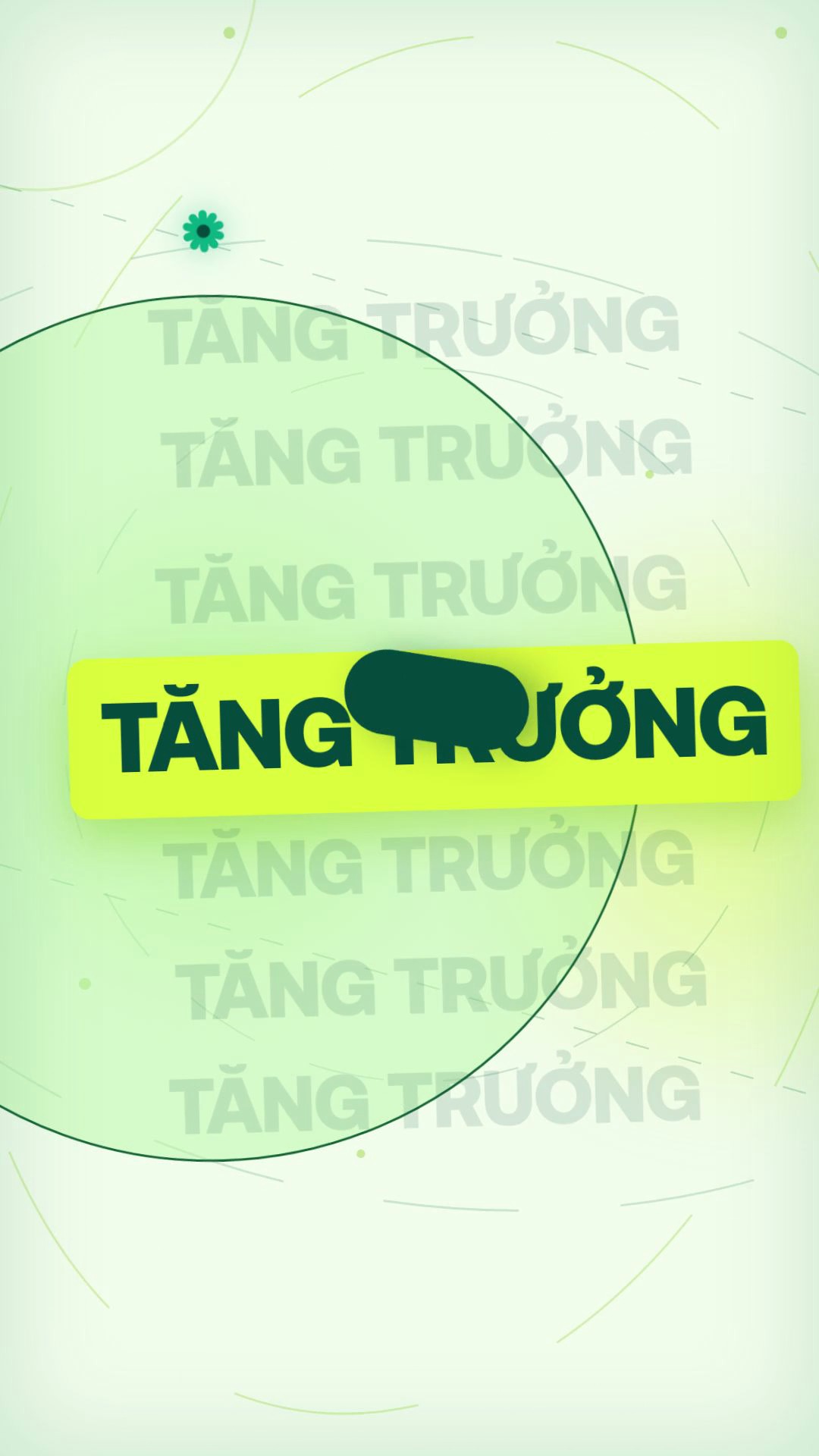
Đảo sang nền Xanh Bạc Hà #F1FCEB: 7 tầng chữ "TĂNG TRƯỞNG" trượt đối xứng + viên nang 3D bay chéo, sau đó cuộn dải ruy-băng mở "Sự rõ ràng".

Dải ruy-băng SVG Bezier khử răng cưa 100% uốn lượn quanh khung ảnh Laptop Parallax kèm băng rôn "Chỉ có dòng chảy & sự tối giản".
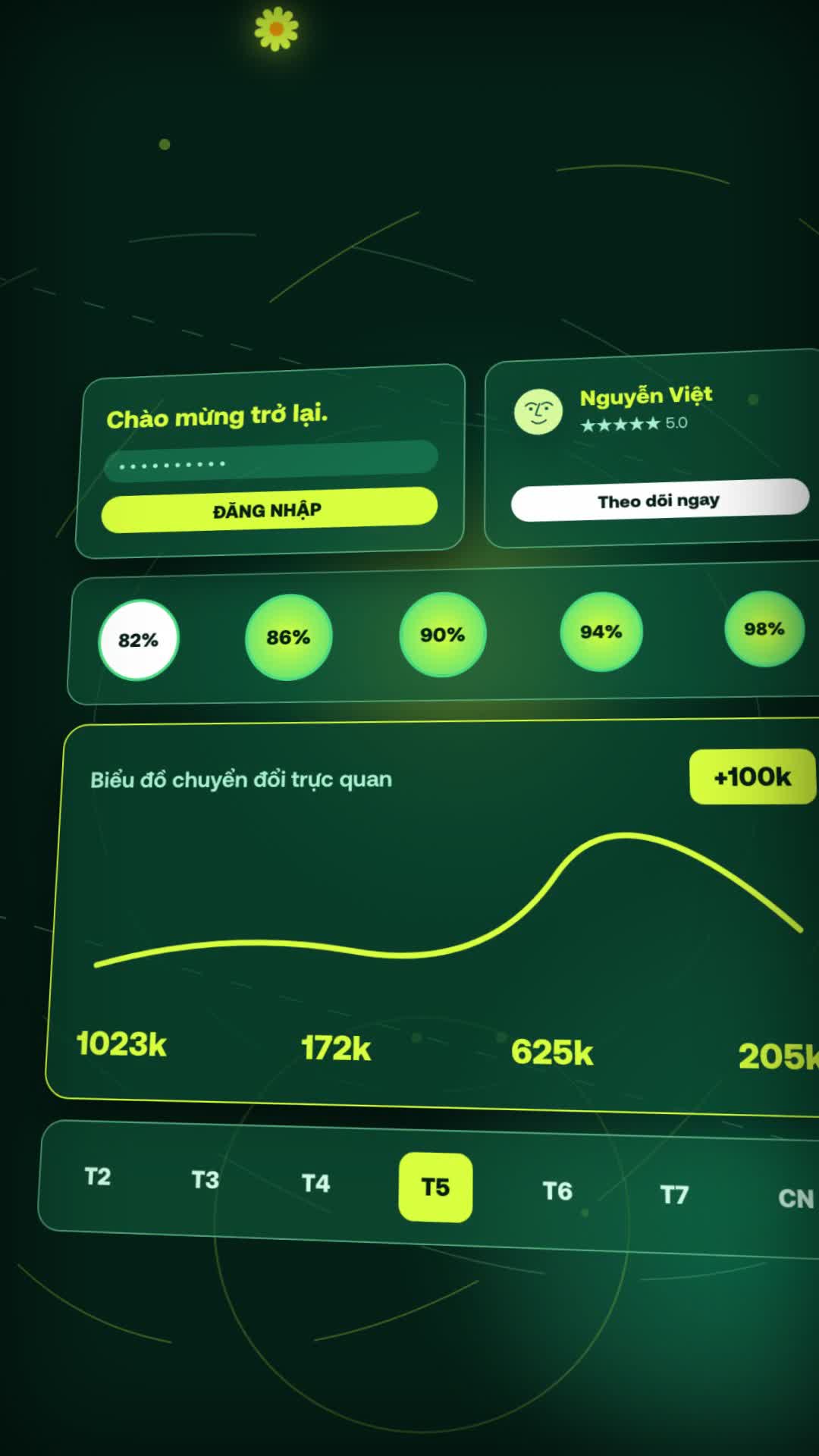
Bảng điều khiển Bento 4 tầng (Đăng nhập, Hồ sơ Nguyễn Việt 5.0★, 5 vòng tiến độ, Biểu đồ sóng +100k) nghiêng 3D Isometric tại 26.2s.
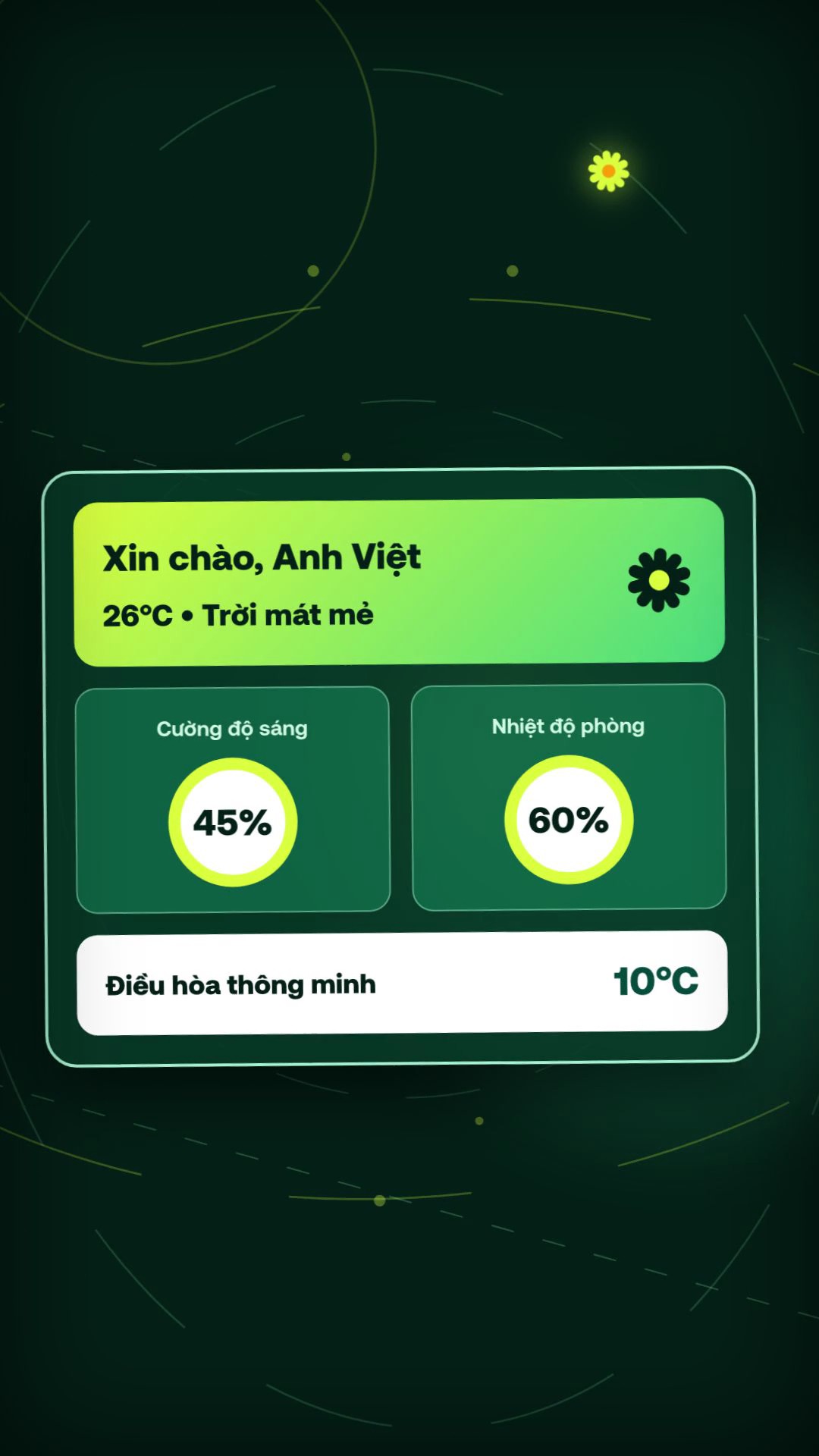
Giao diện Smart Home "Xin chào, Anh Việt • 26°C" (Cường độ sáng 45%, Nhiệt độ phòng 60%) chuyển sang khung Figma "Bố cục thông minh" và ống Neon chữ L "Hành động RÕ RÀNG".

Cụm Avatar lăn ngang mở ra bông hoa cúc nét mảnh khổng lồ (980px) xoay góc dưới cùng 5 dòng chữ xếp tầng "Bởi vì / thiết kế / đỉnh cao / không chỉ là / vẻ bề ngoài".

Màn kết trên nền Xanh Bạc Hà: "Mà là cách nó VẬN HÀNH." chuyển mượt sang câu hỏi kêu gọi hành động "Sẵn sàng bứt phá ?".
2.3. Bảng Tổng Hợp 9 Phân Cảnh, 13 Điểm Cắt Whip-Pan & Biến Tweaks Tương Ứng
| Phân Cảnh | Khung Hình & Giây (30fps) | Điểm Cắt Whip-Pan (CUT_FRAMES) |
Biến Chữ Trong Bảng Tweaks |
Kỹ Thuật Chuyển Động & Âm Thanh SFX |
|---|---|---|---|---|
| Scene 1 | f0 → f144( 0.0s – 4.7s) |
Cắt #1 tại f134 (4.47s) |
scene1Headline, scene1Subline, scene1PillText, scene1HeroWord |
Con trỏ 3D bay Bezier click nút Tia sáng tại f44 (ui_click + glassy_ping), bung 8 tia laser và 4 vòng tròn strokeDashoffset. |
| Scene 2 | f126 → f280( 4.2s – 9.2s) |
Cắt #2 tại f270 (9.00s) |
scene2PhaseA, scene2PhaseBLead/Main/Accent, scene2PhaseCLead/Highlight |
3 pha nối tiếp bằng WHIP_BEZIER: Chữ trượt trên vành tròn ngọc → Chữ nghiêng Serif hỏi ? → Thoi Neon xoay + FigmaSelectionBox. |
| Scene 3 | f262 → f436( 8.7s – 14.4s) |
Cắt #3 tại f313 (10.43s)Cắt #4 tại f426 (14.20s) |
scene3Badge, scene3Verb, scene3HeroBox, scene3TailWhite/Accent |
Cửa chéo -18° mở tại f36–f62 (laser_strike + whoosh_fast), nền B-Roll Studio trôi Ken Burns số thực + 80 chấm sóng. |
| Scene 4 | f418 → f606( 13.9s – 20.1s) |
Cắt #5 tại f596 (19.87s) |
scene4EchoWord, scene4Watermark, scene4CenterBadge |
Đổi nền lightBgColor (sub_bass_impact), 7 hàng chữ TĂNG TRƯỞNG dao động lệch pha, dải ruy-băng chữ S vẽ bằng strokeDashoffset. |
| Scene 5 | f588 → f724( 19.6s – 24.0s) |
Cắt #6 tại f714 (23.80s) |
scene5TopPill, scene5BottomBanner |
Khung ảnh Laptop nghiêng điều hòa ±2.2°, đường cong Bezier bậc 3 (strokeWidth="84") uốn quanh khung ảnh + 2 Avatar xoay ngược chiều. |
| Scene 6 | f706 → f888( 23.5s – 29.5s) |
Cắt #7 tại f786 (26.20s)Cắt #8 tại f834 (27.80s)Cắt #9 tại f879 (29.30s) |
scene6LoginTitle/Cta, scene6ProfileName/Cta, scene6ChartTitle/Badge, scene6HeroWord/Subline |
Khối Bento 3D (perspective: 1400) tự động nghiêng góc Isometric (rotateX(22deg) rotateY(-22deg)) đúng mốc 26.2s và rút về chữ Thiết kế tại 27.8s. |
| Scene 7 | f870 → f1078( 29.0s – 35.8s) |
Cắt #10 tại f975 (32.50s)Cắt #11 tại f1011 (33.70s) |
scene7Greeting, scene7WeatherSub, scene7Gauge1/2Label, scene7AcLabel, scene7BoxHighlight/Normal, scene7PipeLead/Hero |
Tablet Smart Home → Thẻ thời tiết nghiêng -6° kèm khung chọn Figma tại 32.5s → Ống dẫn sáng chữ L chạy dọc màn hình tại 33.7s. |
| Scene 8 | f1060 → f1274( 35.3s – 42.4s) |
Cắt #12 tại f1154 (38.47s)Cắt #13 tại f1263 (42.10s) |
scene8LeadPrefix/Highlight/Suffix, scene8Stack1..5 |
Pha 8A lăn cụm Avatar + Hoa cúc; tại 38.47s trượt sang Pha 8B với 5 dòng chữ nhảy lò xo lệch nhịp 10 frames trên nền Hoa cúc Wireframe 980px. |
| Scene 9 | f1255 → f1420( 41.8s – 47.33s) |
Kết thúc tại f1420 (47.33s) |
scene9Lead, scene9HeroBox, scene9FinaleTop, scene9FinalePill |
Trở lại Light Mint Mode: Hộp VẬN HÀNH. lắc nhẹ rồi nhường chỗ cho đại tự Sẵn sàng bứt phá ? kèm tiếng chuông glassy_ping + ui_pop. |
Phần 3 — Khuôn Thiết Kế Gốc (PinterestViet9x16.tsx Có Bảng Biến Tweaks) & Giải Thích Chi Tiết
3.1. Bảng Biến Tweaks (defaultPinterestViet9x16Props) Dùng Để Làm Gì?
Nếu file .mp4 là sản phẩm đã nướng chín để đăng lên TikTok / Reels / Facebook, thì file PinterestViet9x16.tsx chính là Khuôn Thiết Kế Gốc (tương tự file project gốc trong After Effects hay Canva). Ngay ở đầu file (từ dòng 28 đến dòng 192), toàn bộ 46 tham số điều khiển đã được gom vào một bảng duy nhất gọi là Bảng Biến Tweaks phục vụ 3 mục đích thực tế:
scene1Headline, scene2PhaseCHighlight, scene6ProfileName...). Khi muốn đổi tên "Nguyễn Việt" hay đổi thông điệp sang ngành Bất động sản, Mỹ phẩm, Khóa học, bạn chỉ sửa đúng chuỗi chữ trong ngoặc đơn — mọi hiệu ứng lò xo, nghiêng 3D và tiếng động vẫn khớp tới từng mili-giây.Tweaks có 6 biến màu (darkBgColor, lightBgColor, limeAccentColor, emeraldAccentColor, deepEmeraldColor, lightTextColor) và 2 biến lực Camera (cameraEnergyMultiplier, whipImpulseStrength). Chỉ cần thay 6 mã màu này, cả 9 phân cảnh, cánh hoa cúc, biểu đồ Bento và khung chọn Figma sẽ tự động đổi màu đồng bộ.defaultProps={defaultPinterestViet9x16Props} trong src/Root.tsx, khi bạn chạy lệnh npx remotion studio, cột bên phải trình duyệt sẽ hiển thị 46 ô nhập liệu trực quan. Bạn gõ chữ mới hoặc chọn màu mới tới đâu, màn hình video bên trái cập nhật trực tiếp tới đó.// ============================================================================
// TWEAKS SCHEMA (KHUÔN THIẾT KẾ GỐC — SỬA CHỮ, MÀU & NHỊP TỨC THỜI)
// ============================================================================
export interface PinterestViet9x16Props {
// Scene 1 (0.0s - 4.7s): Tia sáng -> Ý tưởng
scene1Headline?: string;
scene1Subline?: string;
scene1PillText?: string;
scene1HeroWord?: string;
// Scene 2 (4.2s - 9.2s): Bản phác thảo -> Một câu hỏi -> BỨT PHÁ
scene2PhaseA?: string;
scene2PhaseBLead?: string;
scene2PhaseBMain?: string;
scene2PhaseBAccent?: string;
scene2PhaseCLead?: string;
scene2PhaseCHighlight?: string;
// Scene 3 (8.7s - 14.4s): Thiết kế có chủ đích -> Biến Ý TƯỞNG thành trải nghiệm
scene3Badge?: string;
scene3Verb?: string;
scene3HeroBox?: string;
scene3TailWhite?: string;
scene3TailAccent?: string;
// Scene 4 (13.9s - 20.1s): TĂNG TRƯỞNG (7-row echo) -> SỰ RÕ RÀNG
scene4EchoWord?: string;
scene4Watermark?: string;
scene4CenterBadge?: string;
// Scene 5 (19.6s - 24.0s): Không rối rắm -> Chỉ có dòng chảy & sự tối giản
scene5TopPill?: string;
scene5BottomBanner?: string;
// Scene 6 (23.5s - 29.5s): 3D Isometric Bento Dashboard -> Thiết kế định hình hành trình
scene6LoginTitle?: string;
scene6LoginCta?: string;
scene6ProfileName?: string;
scene6ProfileCta?: string;
scene6ChartTitle?: string;
scene6ChartBadge?: string;
scene6HeroWord?: string;
scene6Subline?: string;
// Scene 7 (29.0s - 35.8s): Smart Home UI -> Bố cục thông minh -> Hành động RÕ RÀNG
scene7Greeting?: string;
scene7WeatherSub?: string;
scene7Gauge1Label?: string;
scene7Gauge2Label?: string;
scene7AcLabel?: string;
scene7TiltSub?: string;
scene7BoxHighlight?: string;
scene7BoxNormal?: string;
scene7PipeLead?: string;
scene7PipeHero?: string;
// Scene 8 (35.3s - 42.4s): Chế tác để tiến lên -> Không chỉ là vẻ bề ngoài
scene8LeadPrefix?: string;
scene8LeadHighlight?: string;
scene8LeadSuffix?: string;
scene8Stack1?: string;
scene8Stack2?: string;
scene8Stack3?: string;
scene8Stack4?: string;
scene8Stack5?: string;
// Scene 9 (41.8s - 47.33s): Mà là cách nó VẬN HÀNH -> Sẵn sàng bứt phá?
scene9Lead?: string;
scene9HeroBox?: string;
scene9FinaleTop?: string;
scene9FinalePill?: string;
// Bảng màu chủ đạo (Color Palette Tweaks)
darkBgColor?: string;
lightBgColor?: string;
limeAccentColor?: string;
emeraldAccentColor?: string;
deepEmeraldColor?: string;
lightTextColor?: string;
// Thông số nhịp chuyển động (Motion Rig Tweaks)
cameraEnergyMultiplier?: number;
whipImpulseStrength?: number;
}
export const defaultPinterestViet9x16Props: Required<PinterestViet9x16Props> = {
// Scene 1
scene1Headline: 'Mọi đột phá',
scene1Subline: 'đều bắt đầu từ một',
scene1PillText: 'Tia sáng',
scene1HeroWord: 'Ý tưởng',
// Scene 2
scene2PhaseA: 'Bản phác thảo',
scene2PhaseBLead: 'Một',
scene2PhaseBMain: 'câu',
scene2PhaseBAccent: 'hỏi ?',
scene2PhaseCLead: 'Điều gì xảy ra nếu nó',
scene2PhaseCHighlight: 'BỨT PHÁ',
// Scene 3
scene3Badge: 'Thiết kế có chủ đích',
scene3Verb: 'Biến',
scene3HeroBox: 'Ý TƯỞNG',
scene3TailWhite: 'thành trải nghiệm',
scene3TailAccent: ' sống động.',
// Scene 4
scene4EchoWord: 'TĂNG TRƯỞNG',
scene4Watermark: 'SỰ RÕ RÀNG',
scene4CenterBadge: 'Sự rõ ràng',
// Scene 5
scene5TopPill: 'Không rối rắm — Không chờ đợi',
scene5BottomBanner: 'Chỉ có dòng chảy & sự tối giản',
// Scene 6
scene6LoginTitle: 'Chào mừng trở lại.',
scene6LoginCta: 'ĐĂNG NHẬP',
scene6ProfileName: 'Nguyễn Việt',
scene6ProfileCta: 'Theo dõi ngay',
scene6ChartTitle: 'Biểu đồ chuyển đổi trực quan',
scene6ChartBadge: '+100k',
scene6HeroWord: 'Thiết kế',
scene6Subline: 'định hình toàn bộ hành trình.',
// Scene 7
scene7Greeting: 'Xin chào, Anh Việt',
scene7WeatherSub: '26°C • Trời mát mẻ',
scene7Gauge1Label: 'Cường độ sáng',
scene7Gauge2Label: 'Nhiệt độ phòng',
scene7AcLabel: 'Điều hòa thông minh',
scene7TiltSub: '26°C • Giao diện trực quan',
scene7BoxHighlight: 'Bố cục ',
scene7BoxNormal: 'thông minh',
scene7PipeLead: 'Hành động',
scene7PipeHero: 'RÕ RÀNG',
// Scene 8
scene8LeadPrefix: 'Tất cả được ',
scene8LeadHighlight: 'chế tác',
scene8LeadSuffix: ' để đưa bạn tiến về phía trước.',
scene8Stack1: 'Bởi vì',
scene8Stack2: 'thiết kế',
scene8Stack3: 'đỉnh cao',
scene8Stack4: 'không chỉ là',
scene8Stack5: 'vẻ bề ngoài',
// Scene 9
scene9Lead: 'Mà là cách nó',
scene9HeroBox: 'VẬN HÀNH.',
scene9FinaleTop: 'Sẵn sàng',
scene9FinalePill: 'bứt phá ?',
// Color Palette Tweaks
darkBgColor: '#042016',
lightBgColor: '#F1FCEB',
limeAccentColor: '#DAFF3E',
emeraldAccentColor: '#10B981',
deepEmeraldColor: '#064E3B',
lightTextColor: '#F0F9E8',
// Motion Rig Tweaks
cameraEnergyMultiplier: 1.0,
whipImpulseStrength: 1.0,
};
// ============================================================================
// REUSABLE ANTI-ALIASED SVG VECTOR ACTORS3.2. Giải Phẫu 5 Khối Kiến Trúc Cốt Lõi Bên Trong PinterestViet9x16.tsx Cho Người Mới
Để người mới đọc vào file .tsx dài 2.688 dòng không bị ngợp, dưới đây là sơ đồ 5 khối lắp ghép tuần tự từ trên xuống dưới của file:
| Khối Kiến Trúc | Vị Trí Dòng | Vai Trò Kỹ Thuật & Cách Hoạt Động |
|---|---|---|
Khối 1: Hằng số Easing, CUT_FRAMES & Bảng Biến Tweaks |
Dòng 13 → 192 |
Định nghĩa 3 đường cong gia tốc (EXPO_OUT, EXPO_IN, WHIP_BEZIER), hàm chuẩn hóa dấu Tiếng Việt nfc(), mảng 13 mốc cắt cảnh CUT_FRAMES và 46 biến defaultPinterestViet9x16Props. |
| Khối 2: Bộ Vector Actors Tái Sử Dụng (SVG Sub-Pixel) | Dòng 194 → 384 |
Gồm 4 linh kiện đồ họa vector không bao giờ bị vỡ nét khi phóng to/xoay: <DaisyFlowerSVG> (bông hoa cúc 10 cánh), <LineArtFaceAvatarSVG> (avatar nét vẽ tay), <PointerCursorSVG> (con trỏ 3D phát sáng) và <FigmaSelectionBox> (khung chọn 4 góc vuông). |
Khối 3: Trường Parallax Liên Tục (ContinuousOrbitalBackdrop) |
Dòng 386 → 529 |
Vẽ 2 quầng sáng Bokeh trôi ngược chiều, 7 đường chéo nét đứt chuyển động liên tục, 3 vành đai elip xoay quanh tâm (540, 960) và sóng năng lượng quét dọc màn hình. Khối này đảm bảo 100% khung hình luôn có dòng chảy thị giác (0% frame chết). |
Khối 4: Bộ Điều Phối Global Camera Rig & Whip-Pan Blur |
Dòng 531 → 766 |
Tính toán tọa độ máy quay toàn cục (camX, camY, camScale, camRot). Mỗi khi frame tiến vào phạm vi ±8 frames quanh bất kỳ điểm cắt nào trong CUT_FRAMES, hệ thống tự động bơm xung lực văng whipImpulseX/Y, bật <feGaussianBlur> và viền sắc sai transitionChroma. |
Khối 5: 9 Component Phân Cảnh Độc Lập (Scene1 → Scene9) |
Dòng 768 → 2688 |
Mỗi Scene nhận thời gian nội bộ localFrame = frame - cutFrame và đối tượng t (chứa toàn bộ biến Tweaks). Nhờ vậy bạn có thể chỉnh sửa giao diện của từng Scene hoàn toàn độc lập mà không sợ làm xô lệch các Scene còn lại. |
...rawProps,
};
const frame = useCurrentFrame();
const { fps } = useVideoConfig();
// Light Mint Mode active during 14.2s..23.8s (f426..f714) and 42.1s..47.33s (f1263..f1420)
const isLightMode =
(frame >= 426 && frame < 714) || frame >= 1263;
// --------------------------------------------------------------------------
// 1. CONTINUOUS GLOBAL CAMERA RIG + WHIP IMPULSES AT ALL 13 CUT POINTS
// --------------------------------------------------------------------------
let whipImpulseX = 0;
let whipImpulseY = 0;
let whipZoom = 0;
let blurX = 0;
let blurY = 0;
let transitionChroma = 0;
const whipScale = props.whipImpulseStrength;
for (let i = 0; i < CUT_FRAMES.length; i++) {
const cf = CUT_FRAMES[i];
const dist = frame - cf;
if (Math.abs(dist) <= 8) {
const w = Math.cos((dist / 8) * (Math.PI / 2)) * whipScale;
const dir = i % 2 === 0 ? 1 : -1;
whipImpulseX += dir * Math.sin((dist / 8) * Math.PI) * 95 * whipScale;
whipImpulseY += (i % 3 === 0 ? -1 : 1) * Math.sin((dist / 8) * Math.PI) * 65 * whipScale;
whipZoom += w * 0.14;
blurX = Math.max(blurX, w * 22);
blurY = Math.max(blurY, w * 14);
transitionChroma = Math.max(transitionChroma, w * 12);
}
}
// Extra kinetic bursts in 8-12s (f240-360), 20-28s (f600-840), and 32-36s (f960-1080)
// to match the high velocity peaks of the Pinterest original
const highEnergyZone =
(frame >= 240 && frame <= 360) ||
(frame >= 600 && frame <= 840) ||
(frame >= 960 && frame <= 1080);
const energyMult = (highEnergyZone ? 1.65 : 1.15) * props.cameraEnergyMultiplier;
const camX =
Math.sin(frame * 0.085) * 34 * energyMult +
Math.cos(frame * 0.17) * 14 +
whipImpulseX;
const camY =
Math.cos(frame * 0.075) * 38 * energyMult +
Math.sin(frame * 0.15) * 16 +
whipImpulseY;
const camScale =
1.03 +
Math.sin(frame * 0.06) * 0.035 * energyMult +
whipZoom;
const camRot = Math.sin(frame * 0.05) * 1.4 * energyMult;
// Global Hero Daisy Flower coordinates (travels seamlessly across all scenes!)
const heroFlowerX =
540 +
Math.sin(frame * 0.09) * 290 +
whipImpulseX * 1.3;
const heroFlowerY =
420 +
Math.cos(frame * 0.07) * 380 +
whipImpulseY * 1.3;
return (
<AbsoluteFill
style={{
backgroundColor: isLightMode ? props.lightBgColor : props.darkBgColor,
overflow: 'hidden',
fontFamily: "'SVN-Aeonik', sans-serif",
}}
>
{/* SVG Directional Motion Blur Filter */}
<svg width="0" height="0" style={{ position: 'absolute' }}>3.3. Toàn Bộ Mã Nguồn Khuôn Thiết Kế Gốc PinterestViet9x16.tsx (Đầy Đủ 2.688 Dòng — Copy 1-Chạm)
Dưới đây là toàn bộ 100% mã nguồn file src/compositions/PinterestViet9x16.tsx đã tích hợp sẵn bảng biến Tweaks. Bạn chỉ cần bấm nút "Sao chép toàn bộ Khuôn .tsx" để dán thẳng vào dự án Remotion của mình:
import React from 'react';
import {
AbsoluteFill,
Easing,
Img,
interpolate,
spring,
staticFile,
useCurrentFrame,
useVideoConfig,
} from 'remotion';
const EXPO_OUT = Easing.bezier(0.16, 1, 0.3, 1);
const EXPO_IN = Easing.bezier(0.7, 0, 0.84, 0);
const WHIP_BEZIER = Easing.bezier(0.68, 0, 0.18, 1);
const clamp01 = (v: number): number => Math.min(1, Math.max(0, v));
const nfc = (s: string): string => s.normalize('NFC');
// Exact transition timestamps from original Pinterest video measured by Opus (in frames @ 30fps)
// 4.47s(134), 9.0s(270), 10.43s(313), 14.2s(426), 19.87s(596), 23.8s(714),
// 26.2s(786), 27.8s(834), 29.3s(879), 32.5s(975), 33.7s(1011), 38.47s(1154), 42.1s(1263)
const CUT_FRAMES = [134, 270, 313, 426, 596, 714, 786, 834, 879, 975, 1011, 1154, 1263];
// ============================================================================
// TWEAKS SCHEMA (KHUÔN THIẾT KẾ GỐC — SỬA CHỮ, MÀU & NHỊP TỨC THỜI)
// ============================================================================
export interface PinterestViet9x16Props {
  // Scene 1 (0.0s - 4.7s): Tia sáng -> Ý tưởng
  scene1Headline?: string;
  scene1Subline?: string;
  scene1PillText?: string;
  scene1HeroWord?: string;

  // Scene 2 (4.2s - 9.2s): Bản phác thảo -> Một câu hỏi -> BỨT PHÁ
  scene2PhaseA?: string;
  scene2PhaseBLead?: string;
  scene2PhaseBMain?: string;
  scene2PhaseBAccent?: string;
  scene2PhaseCLead?: string;
  scene2PhaseCHighlight?: string;

  // Scene 3 (8.7s - 14.4s): Thiết kế có chủ đích -> Biến Ý TƯỞNG thành trải nghiệm
  scene3Badge?: string;
  scene3Verb?: string;
  scene3HeroBox?: string;
  scene3TailWhite?: string;
  scene3TailAccent?: string;

  // Scene 4 (13.9s - 20.1s): TĂNG TRƯỞNG (7-row echo) -> SỰ RÕ RÀNG
  scene4EchoWord?: string;
  scene4Watermark?: string;
  scene4CenterBadge?: string;

  // Scene 5 (19.6s - 24.0s): Không rối rắm -> Chỉ có dòng chảy & sự tối giản
  scene5TopPill?: string;
  scene5BottomBanner?: string;

  // Scene 6 (23.5s - 29.5s): 3D Isometric Bento Dashboard -> Thiết kế định hình hành trình
  scene6LoginTitle?: string;
  scene6LoginCta?: string;
  scene6ProfileName?: string;
  scene6ProfileCta?: string;
  scene6ChartTitle?: string;
  scene6ChartBadge?: string;
  scene6HeroWord?: string;
  scene6Subline?: string;

  // Scene 7 (29.0s - 35.8s): Smart Home UI -> Bố cục thông minh -> Hành động RÕ RÀNG
  scene7Greeting?: string;
  scene7WeatherSub?: string;
  scene7Gauge1Label?: string;
  scene7Gauge2Label?: string;
  scene7AcLabel?: string;
  scene7TiltSub?: string;
  scene7BoxHighlight?: string;
  scene7BoxNormal?: string;
  scene7PipeLead?: string;
  scene7PipeHero?: string;

  // Scene 8 (35.3s - 42.4s): Chế tác để tiến lên -> Không chỉ là vẻ bề ngoài
  scene8LeadPrefix?: string;
  scene8LeadHighlight?: string;
  scene8LeadSuffix?: string;
  scene8Stack1?: string;
  scene8Stack2?: string;
  scene8Stack3?: string;
  scene8Stack4?: string;
  scene8Stack5?: string;

  // Scene 9 (41.8s - 47.33s): Mà là cách nó VẬN HÀNH -> Sẵn sàng bứt phá?
  scene9Lead?: string;
  scene9HeroBox?: string;
  scene9FinaleTop?: string;
  scene9FinalePill?: string;

  // Bảng màu chủ đạo (Color Palette Tweaks)
  darkBgColor?: string;
  lightBgColor?: string;
  limeAccentColor?: string;
  emeraldAccentColor?: string;
  deepEmeraldColor?: string;
  lightTextColor?: string;

  // Thông số nhịp chuyển động (Motion Rig Tweaks)
  cameraEnergyMultiplier?: number;
  whipImpulseStrength?: number;
}

export const defaultPinterestViet9x16Props: Required<PinterestViet9x16Props> = {
  // Scene 1
  scene1Headline: 'Mọi đột phá',
  scene1Subline: 'đều bắt đầu từ một',
  scene1PillText: 'Tia sáng',
  scene1HeroWord: 'Ý tưởng',

  // Scene 2
  scene2PhaseA: 'Bản phác thảo',
  scene2PhaseBLead: 'Một',
  scene2PhaseBMain: 'câu',
  scene2PhaseBAccent: 'hỏi ?',
  scene2PhaseCLead: 'Điều gì xảy ra nếu nó',
  scene2PhaseCHighlight: 'BỨT PHÁ',

  // Scene 3
  scene3Badge: 'Thiết kế có chủ đích',
  scene3Verb: 'Biến',
  scene3HeroBox: 'Ý TƯỞNG',
  scene3TailWhite: 'thành trải nghiệm',
  scene3TailAccent: ' sống động.',

  // Scene 4
  scene4EchoWord: 'TĂNG TRƯỞNG',
  scene4Watermark: 'SỰ RÕ RÀNG',
  scene4CenterBadge: 'Sự rõ ràng',

  // Scene 5
  scene5TopPill: 'Không rối rắm  —  Không chờ đợi',
  scene5BottomBanner: 'Chỉ có dòng chảy & sự tối giản',

  // Scene 6
  scene6LoginTitle: 'Chào mừng trở lại.',
  scene6LoginCta: 'ĐĂNG NHẬP',
  scene6ProfileName: 'Nguyễn Việt',
  scene6ProfileCta: 'Theo dõi ngay',
  scene6ChartTitle: 'Biểu đồ chuyển đổi trực quan',
  scene6ChartBadge: '+100k',
  scene6HeroWord: 'Thiết kế',
  scene6Subline: 'định hình toàn bộ hành trình.',

  // Scene 7
  scene7Greeting: 'Xin chào, Anh Việt',
  scene7WeatherSub: '26°C  •  Trời mát mẻ',
  scene7Gauge1Label: 'Cường độ sáng',
  scene7Gauge2Label: 'Nhiệt độ phòng',
  scene7AcLabel: 'Điều hòa thông minh',
  scene7TiltSub: '26°C  •  Giao diện trực quan',
  scene7BoxHighlight: 'Bố cục ',
  scene7BoxNormal: 'thông minh',
  scene7PipeLead: 'Hành động',
  scene7PipeHero: 'RÕ RÀNG',

  // Scene 8
  scene8LeadPrefix: 'Tất cả được ',
  scene8LeadHighlight: 'chế tác',
  scene8LeadSuffix: ' để đưa bạn tiến về phía trước.',
  scene8Stack1: 'Bởi vì',
  scene8Stack2: 'thiết kế',
  scene8Stack3: 'đỉnh cao',
  scene8Stack4: 'không chỉ là',
  scene8Stack5: 'vẻ bề ngoài',

  // Scene 9
  scene9Lead: 'Mà là cách nó',
  scene9HeroBox: 'VẬN HÀNH.',
  scene9FinaleTop: 'Sẵn sàng',
  scene9FinalePill: 'bứt phá ?',

  // Color Palette Tweaks
  darkBgColor: '#042016',
  lightBgColor: '#F1FCEB',
  limeAccentColor: '#DAFF3E',
  emeraldAccentColor: '#10B981',
  deepEmeraldColor: '#064E3B',
  lightTextColor: '#F0F9E8',

  // Motion Rig Tweaks
  cameraEnergyMultiplier: 1.0,
  whipImpulseStrength: 1.0,
};

// ============================================================================
// REUSABLE ANTI-ALIASED SVG VECTOR ACTORS
// ============================================================================
const DaisyFlowerSVG: React.FC<{
size?: number;
petalColor?: string;
centerColor?: string;
rotationDeg?: number;
outlineOnly?: boolean;
strokeWidth?: number;
glowColor?: string;
}> = ({
size = 64,
petalColor = '#DAFF3E',
centerColor = '#FEF08A',
rotationDeg = 0,
outlineOnly = false,
strokeWidth = 2.5,
glowColor,
}) => {
const angles = [0, 36, 72, 108, 144, 180, 216, 252, 288, 324];
return (
<svg
width={size}
height={size}
viewBox="0 0 100 100"
style={{
transform: `rotate(${rotationDeg}deg)`,
filter: glowColor ? `drop-shadow(0 0 22px ${glowColor})` : undefined,
willChange: 'transform',
flexShrink: 0,
}}
>
{angles.map((a) => (
<g key={a} transform={`rotate(${a} 50 50)`}>
<rect
x="41.5"
y="6"
width="17"
height="42"
rx="8.5"
fill={outlineOnly ? 'none' : petalColor}
stroke={outlineOnly ? petalColor : 'none'}
strokeWidth={outlineOnly ? strokeWidth : 0}
/>
</g>
))}
{!outlineOnly && <circle cx="50" cy="50" r="14" fill={centerColor} />}
</svg>
);
};
const LineArtFaceAvatarSVG: React.FC<{
size?: number;
bgColor?: string;
strokeColor?: string;
rotationDeg?: number;
}> = ({
size = 88,
bgColor = '#D9F99D',
strokeColor = '#064E3B',
rotationDeg = 0,
}) => (
<svg
width={size}
height={size}
viewBox="0 0 100 100"
style={{
transform: `rotate(${rotationDeg}deg)`,
filter: 'drop-shadow(0 10px 24px rgba(0,0,0,0.22))',
flexShrink: 0,
}}
>
<circle
cx="50"
cy="50"
r="46"
fill={bgColor}
stroke={strokeColor}
strokeWidth="2.5"
/>
<path
d="M26 38 Q36 28 46 36"
fill="none"
stroke={strokeColor}
strokeWidth="2.8"
strokeLinecap="round"
/>
<path
d="M56 36 Q66 28 76 38"
fill="none"
stroke={strokeColor}
strokeWidth="2.8"
strokeLinecap="round"
/>
<path
d="M52 34 L45 56 L55 58"
fill="none"
stroke={strokeColor}
strokeWidth="2.8"
strokeLinecap="round"
strokeLinejoin="round"
/>
<circle cx="36" cy="44" r="3.2" fill={strokeColor} />
<circle cx="65" cy="44" r="3.2" fill={strokeColor} />
<path
d="M38 68 Q50 78 64 67"
fill="none"
stroke={strokeColor}
strokeWidth="2.8"
strokeLinecap="round"
/>
</svg>
);
const PointerCursorSVG: React.FC<{
scale?: number;
rotateDeg?: number;
color?: string;
}> = ({ scale = 1, rotateDeg = 0, color = '#DAFF3E' }) => (
<svg
width="56"
height="56"
viewBox="0 0 48 48"
style={{
transform: `scale(${scale}) rotate(${rotateDeg}deg)`,
transformOrigin: 'top left',
filter: `drop-shadow(0 12px 20px rgba(0,0,0,0.55)) drop-shadow(0 0 16px ${color})`,
}}
>
<path
d="M6 4L40 19L23 24.5L17.5 41L6 4Z"
fill={color}
stroke="#FFFFFF"
strokeWidth="2.5"
strokeLinejoin="round"
/>
</svg>
);
const FigmaSelectionBox: React.FC<{
children: React.ReactNode;
borderColor?: string;
padding?: string;
progress?: number;
}> = ({
children,
borderColor = '#4ADE80',
padding = '10px 24px',
progress = 1,
}) => {
const hs = 12;
const corners = [
{ top: -hs / 2, left: -hs / 2 },
{ top: -hs / 2, right: -hs / 2 },
{ bottom: -hs / 2, left: -hs / 2 },
{ bottom: -hs / 2, right: -hs / 2 },
];
return (
<div
style={{
position: 'relative',
display: 'inline-flex',
alignItems: 'center',
justifyContent: 'center',
padding,
border: `2.5px solid ${borderColor}`,
background: 'rgba(16, 185, 129, 0.12)',
transform: `scale(${0.85 + 0.15 * progress})`,
opacity: clamp01(progress * 1.2),
}}
>
{corners.map((pos, idx) => (
<div
key={idx}
style={{
position: 'absolute',
...pos,
width: hs,
height: hs,
backgroundColor: '#FFFFFF',
border: `2px solid ${borderColor}`,
boxShadow: `0 0 10px ${borderColor}`,
}}
/>
))}
{children}
</div>
);
};
// ============================================================================
// DYNAMIC PARALLAX FIELD (Ensures continuous full-frame optical flow & 0% dead frames)
// ============================================================================
const ContinuousOrbitalBackdrop: React.FC<{
frame: number;
isLightMode: boolean;
camX: number;
camY: number;
darkBgColor: string;
lightBgColor: string;
}> = ({ frame, isLightMode, camX, camY, darkBgColor, lightBgColor }) => {
const strokeCol = isLightMode
? 'rgba(16, 120, 68, 0.24)'
: 'rgba(134, 239, 172, 0.24)';
const accentCol = isLightMode
? 'rgba(132, 204, 22, 0.38)'
: 'rgba(218, 255, 62, 0.34)';
// Continuous sweeping motion across the entire 1080x1920 canvas
const sweepX = ((frame * 6.5) % 1400) - 200;
const sweepY = ((frame * 5.2) % 2200) - 200;
return (
<AbsoluteFill
style={{
backgroundColor: isLightMode ? lightBgColor : darkBgColor,
overflow: 'hidden',
}}
>
{/* 3 Moving Bokeh Mesh Orbs */}
<div
style={{
position: 'absolute',
left: 140 + Math.sin(frame * 0.05) * 260 + camX * 0.35,
top: 280 + Math.cos(frame * 0.04) * 320 + camY * 0.35,
width: 780,
height: 780,
borderRadius: 9999,
background: isLightMode
? 'radial-gradient(circle, rgba(187, 247, 150, 0.85) 0%, rgba(241, 252, 235, 0) 70%)'
: 'radial-gradient(circle, rgba(218, 255, 62, 0.42) 0%, rgba(16, 185, 129, 0.18) 45%, rgba(4, 32, 22, 0) 72%)',
filter: 'blur(36px)',
}}
/>
<div
style={{
position: 'absolute',
right: -120 + Math.cos(frame * 0.045) * 240 - camX * 0.4,
bottom: 180 + Math.sin(frame * 0.055) * 290 - camY * 0.4,
width: 860,
height: 860,
borderRadius: 9999,
background: isLightMode
? 'radial-gradient(circle, rgba(217, 249, 120, 0.78) 0%, rgba(241, 252, 235, 0) 70%)'
: 'radial-gradient(circle, rgba(16, 185, 129, 0.52) 0%, rgba(52, 211, 153, 0.2) 50%, rgba(4, 32, 22, 0) 74%)',
filter: 'blur(40px)',
}}
/>
{/* Full-Canvas Moving Architectural Grid & Orbital Rings (guarantees continuous global optical flow) */}
<svg
width="1080"
height="1920"
viewBox="0 0 1080 1920"
style={{
position: 'absolute',
inset: 0,
transform: `translate3d(${camX * 0.55}px, ${camY * 0.55}px, 0) scale(${1.08 + Math.sin(frame * 0.03) * 0.04})`,
}}
>
{/* Diagonal kinetic flow lines across entire viewport */}
{[-600, -200, 200, 600, 1000, 1400, 1800].map((baseY, idx) => {
const yShift = (baseY + frame * (idx % 2 === 0 ? 5.8 : -5.4)) % 2400 - 300;
return (
<g key={idx}>
<line
x1="-200"
y1={yShift}
x2="1280"
y2={yShift + 420}
stroke={strokeCol}
strokeWidth="2"
strokeDasharray="28 36"
strokeDashoffset={-frame * 7}
/>
<circle
cx={((frame * (7 + idx) + idx * 190) % 1160) - 40}
cy={(yShift + 210 + 1920) % 1920}
r={idx % 2 === 0 ? 7 : 5}
fill={accentCol}
/>
</g>
);
})}
{/* Rotating Giant Orbital Rings */}
<g
transform={`translate(540, 960) rotate(${frame * 1.35})`}
opacity="0.75"
>
<ellipse
cx="0"
cy="0"
rx="560"
ry="820"
fill="none"
stroke={strokeCol}
strokeWidth="2.5"
strokeDasharray="160 120"
/>
<ellipse
cx="0"
cy="0"
rx="820"
ry="540"
fill="none"
stroke={accentCol}
strokeWidth="2.5"
strokeDasharray="220 180"
/>
<circle
cx="0"
cy="0"
r="420"
fill="none"
stroke={strokeCol}
strokeWidth="2"
strokeDasharray="90 70"
/>
</g>
{/* Sweeping Energy Wave */}
<circle
cx={sweepX}
cy={sweepY}
r="260"
fill="none"
stroke={accentCol}
strokeWidth="3"
opacity="0.55"
/>
</svg>
</AbsoluteFill>
);
};
// ============================================================================
// MAIN COMPOSITION: PinterestViet9x16 (1080x1920 @ 30fps, 1420 frames = 47.33s)
// ============================================================================
export const PinterestViet9x16: React.FC<PinterestViet9x16Props> = (rawProps) => {
const props: Required<PinterestViet9x16Props> = {
...defaultPinterestViet9x16Props,
    ...rawProps,
  };
  const frame = useCurrentFrame();
  const { fps } = useVideoConfig();

  // Light Mint Mode active during 14.2s..23.8s (f426..f714) and 42.1s..47.33s (f1263..f1420)
  const isLightMode =
    (frame >= 426 && frame < 714) || frame >= 1263;

  // --------------------------------------------------------------------------
  // 1. CONTINUOUS GLOBAL CAMERA RIG + WHIP IMPULSES AT ALL 13 CUT POINTS
  // --------------------------------------------------------------------------
  let whipImpulseX = 0;
  let whipImpulseY = 0;
  let whipZoom = 0;
  let blurX = 0;
  let blurY = 0;
  let transitionChroma = 0;

  const whipScale = props.whipImpulseStrength;

  for (let i = 0; i < CUT_FRAMES.length; i++) {
    const cf = CUT_FRAMES[i];
    const dist = frame - cf;
    if (Math.abs(dist) <= 8) {
      const w = Math.cos((dist / 8) * (Math.PI / 2)) * whipScale;
      const dir = i % 2 === 0 ? 1 : -1;
      whipImpulseX += dir * Math.sin((dist / 8) * Math.PI) * 95 * whipScale;
      whipImpulseY += (i % 3 === 0 ? -1 : 1) * Math.sin((dist / 8) * Math.PI) * 65 * whipScale;
      whipZoom += w * 0.14;
      blurX = Math.max(blurX, w * 22);
      blurY = Math.max(blurY, w * 14);
      transitionChroma = Math.max(transitionChroma, w * 12);
    }
  }

  // Extra kinetic bursts in 8-12s (f240-360), 20-28s (f600-840), and 32-36s (f960-1080)
  // to match the high velocity peaks of the Pinterest original
  const highEnergyZone =
    (frame >= 240 && frame <= 360) ||
    (frame >= 600 && frame <= 840) ||
    (frame >= 960 && frame <= 1080);
  const energyMult = (highEnergyZone ? 1.65 : 1.15) * props.cameraEnergyMultiplier;

  const camX =
    Math.sin(frame * 0.085) * 34 * energyMult +
    Math.cos(frame * 0.17) * 14 +
    whipImpulseX;
  const camY =
    Math.cos(frame * 0.075) * 38 * energyMult +
    Math.sin(frame * 0.15) * 16 +
    whipImpulseY;
  const camScale =
    1.03 +
    Math.sin(frame * 0.06) * 0.035 * energyMult +
    whipZoom;
  const camRot = Math.sin(frame * 0.05) * 1.4 * energyMult;

  // Global Hero Daisy Flower coordinates (travels seamlessly across all scenes!)
  const heroFlowerX =
    540 +
    Math.sin(frame * 0.09) * 290 +
    whipImpulseX * 1.3;
  const heroFlowerY =
    420 +
    Math.cos(frame * 0.07) * 380 +
    whipImpulseY * 1.3;

  return (
    <AbsoluteFill
      style={{
        backgroundColor: isLightMode ? props.lightBgColor : props.darkBgColor,
        overflow: 'hidden',
        fontFamily: "'SVN-Aeonik', sans-serif",
      }}
    >
      {/* SVG Directional Motion Blur Filter */}
      <svg width="0" height="0" style={{ position: 'absolute' }}>
<defs>
<filter id="dirMotionBlur" x="-20%" y="-20%" width="140%" height="140%">
<feGaussianBlur
in="SourceGraphic"
stdDeviation={`${blurX.toFixed(1)}, ${blurY.toFixed(1)}`}
/>
</filter>
</defs>
</svg>
{/* LAYER 0: CONTINUOUS ORBITAL BACKDROP */}
<ContinuousOrbitalBackdrop
frame={frame}
isLightMode={isLightMode}
camX={camX}
camY={camY}
darkBgColor={props.darkBgColor}
lightBgColor={props.lightBgColor}
/>
{/* LAYER 1: WORLD CAMERA CONTAINER WITH DIRECTIONAL MOTION BLUR */}
<AbsoluteFill
style={{
transform: `translate3d(${camX}px, ${camY}px, 0) scale(${camScale}) rotate(${camRot}deg)`,
filter: blurX > 1.2 || blurY > 1.2 ? 'url(#dirMotionBlur)' : undefined,
willChange: 'transform, filter',
}}
>
{/* ==================================================================
SCENE 1 (f0 -> f142 | 0.0s -> 4.7s):
"Mọi đột phá đều bắt đầu từ một [ 🌼 Tia sáng ] -> Ý TƯỞNG"
================================================================== */}
{frame < 144 && (
<Scene1SparkAndIdea frame={frame} fps={fps} t={props} />
)}
{/* ==================================================================
SCENE 2 (f126 -> f278 | 4.2s -> 9.2s):
"Bản phác thảo -> Một câu hỏi -> Điều gì xảy ra nếu nó [ BỨT PHÁ ] ?"
================================================================== */}
{frame >= 126 && frame < 280 && (
<Scene2SketchQuestionGrow frame={frame - 134} fps={fps} t={props} />
)}
{/* ==================================================================
SCENE 3 (f262 -> f434 | 8.7s -> 14.4s):
Portal Zoom -> Diagonal Studio Split -> "Biến [ Ý TƯỞNG ] thành trải nghiệm"
================================================================== */}
{frame >= 262 && frame < 436 && (
<Scene3PurposefulDesignStudio frame={frame - 270} fps={fps} t={props} />
)}
{/* ==================================================================
SCENE 4 (f418 -> f604 | 13.9s -> 20.1s):
Light Mint Mode: "TĂNG TRƯỞNG" Echo Stack -> "Người dùng cần SỰ RÕ RÀNG"
================================================================== */}
{frame >= 418 && frame < 606 && (
<Scene4GrowthAndClarity frame={frame - 426} fps={fps} t={props} />
)}
{/* ==================================================================
SCENE 5 (f588 -> f722 | 19.6s -> 24.0s):
Laptop B-Roll + 3D S-Curve Bezier Ribbon: "Không rối rắm — Chỉ có dòng chảy"
================================================================== */}
{frame >= 588 && frame < 724 && (
<Scene5RibbonFlowLaptop frame={frame - 596} fps={fps} t={props} />
)}
{/* ==================================================================
SCENE 6 (f706 -> f886 | 23.5s -> 29.5s):
3D Isometric Bento Glassmorphism Dashboard -> "Thiết kế định hình hành trình"
================================================================== */}
{frame >= 706 && frame < 888 && (
<Scene6BentoDashboard3D frame={frame - 714} fps={fps} t={props} />
)}
{/* ==================================================================
SCENE 7 (f870 -> f1076 | 29.0s -> 35.8s):
Smart Home UI -> "[ Bố cục thông minh ]" -> Neon Pipe "Hành động rõ ràng"
================================================================== */}
{frame >= 870 && frame < 1078 && (
<Scene7SmartHomeAndActions frame={frame - 879} fps={fps} t={props} />
)}
{/* ==================================================================
SCENE 8 (f1060 -> f1272 | 35.3s -> 42.4s):
"Tất cả được chế tác để tiến lên -> Không chỉ là VẺ BỀ NGOÀI"
================================================================== */}
{frame >= 1060 && frame < 1274 && (
<Scene8CraftedAndHowItLooks frame={frame - 1068} fps={fps} t={props} />
)}
{/* ==================================================================
SCENE 9 (f1255 -> f1420 | 41.8s -> 47.33s):
Light Mint Finale: "✳️ Mà là cách nó [ VẬN HÀNH ] -> ✳️ Sẵn sàng bứt phá?"
================================================================== */}
{frame >= 1255 && (
<Scene9WorksAndReadyFinale frame={frame - 1263} fps={fps} t={props} />
)}
{/* CONTINUOUS SHARED GUIDE MOTIF: Travelling Daisy Sparkle across scenes */}
<div
style={{
position: 'absolute',
left: heroFlowerX,
top: heroFlowerY,
transform: 'translate(-50%, -50%)',
pointerEvents: 'none',
zIndex: 60,
}}
>
<DaisyFlowerSVG
size={62}
petalColor={isLightMode ? props.emeraldAccentColor : props.limeAccentColor}
centerColor={isLightMode ? props.deepEmeraldColor : '#F59E0B'}
rotationDeg={frame * 7.5}
glowColor={
isLightMode
? 'rgba(16, 185, 129, 0.45)'
: 'rgba(218, 255, 62, 0.65)'
}
/>
</div>
</AbsoluteFill>
{/* LAYER 2: CAPCUT OPTICAL EDGE VIGNETTE & TRANSITION CHROMA BURST */}
<AbsoluteFill
style={{
pointerEvents: 'none',
boxShadow: isLightMode
? 'inset 0 0 140px rgba(16, 120, 68, 0.18)'
: 'inset 0 0 160px rgba(0, 0, 0, 0.65)',
border:
transitionChroma > 1.5
? `${Math.round(transitionChroma * 0.7)}px solid rgba(218, 255, 62, 0.35)`
: 'none',
}}
/>
{transitionChroma > 1.5 && (
<AbsoluteFill
style={{
pointerEvents: 'none',
mixBlendMode: 'screen',
background: `radial-gradient(circle at 50% 50%, transparent 55%, rgba(239, 68, 68, ${(
transitionChroma * 0.025
).toFixed(3)}) 82%, rgba(59, 130, 246, ${(
transitionChroma * 0.035
).toFixed(3)}) 100%)`,
}}
/>
)}
</AbsoluteFill>
);
};
// ============================================================================
// SCENE 1 (f0..142): "Mọi đột phá đều bắt đầu từ một [ 🌼 Tia sáng ] -> Ý TƯỞNG"
// ============================================================================
const Scene1SparkAndIdea: React.FC<{
frame: number;
fps: number;
t: Required<PinterestViet9x16Props>;
}> = ({ frame, fps, t }) => {
const enterP = spring({
frame,
fps,
config: { mass: 0.8, damping: 13, stiffness: 160 },
});
const morphToIdeaP = interpolate(frame, [74, 96], [0, 1], {
extrapolateLeft: 'clamp',
extrapolateRight: 'clamp',
easing: WHIP_BEZIER,
});
const exitP = interpolate(frame, [124, 140], [0, 1], {
extrapolateLeft: 'clamp',
extrapolateRight: 'clamp',
easing: EXPO_IN,
});
// Cursor Bezier flight from bottom right to click the "[ 🌼 Tia sáng ]" button at f44
const curP = interpolate(frame, [12, 44], [0, 1], {
extrapolateLeft: 'clamp',
extrapolateRight: 'clamp',
easing: EXPO_OUT,
});
const curX = interpolate(curP, [0, 1], [940, 580]) + Math.sin(frame * 0.14) * 18;
const curY = interpolate(curP, [0, 1], [1560, 1085]) + Math.cos(frame * 0.12) * 14;
const clickBurstP = interpolate(frame, [42, 76], [0, 1], {
extrapolateLeft: 'clamp',
extrapolateRight: 'clamp',
easing: EXPO_OUT,
});
const ideaPopP = spring({
frame: Math.max(0, frame - 82),
fps,
config: { mass: 0.85, damping: 11, stiffness: 185 },
});
return (
<AbsoluteFill
style={{
opacity: clamp01(enterP) * (1 - exitP),
transform: `scale(${0.92 + 0.08 * enterP + exitP * 0.35})`,
justifyContent: 'center',
alignItems: 'center',
}}
>
{/* Part 1A: "Mọi đột phá / đều bắt đầu từ / [ 🌼 Tia sáng ]" */}
<div
style={{
position: 'absolute',
width: 920,
display: 'flex',
flexDirection: 'column',
alignItems: 'center',
gap: 28,
opacity: 1 - morphToIdeaP,
transform: `translate3d(0, ${-morphToIdeaP * 260 + Math.sin(frame * 0.1) * 12}px, 0) scale(${1 + morphToIdeaP * 0.35})`,
}}
>
<div
style={{
fontSize: 92,
fontWeight: 900,
color: t.limeAccentColor,
letterSpacing: '-0.03em',
textAlign: 'center',
textShadow: '0 0 36px rgba(218, 255, 62, 0.45)',
}}
>
{nfc(t.scene1Headline)}
</div>
<div
style={{
fontSize: 64,
fontWeight: 500,
color: t.lightTextColor,
textAlign: 'center',
opacity: interpolate(frame, [10, 26], [0, 1], {
extrapolateLeft: 'clamp',
extrapolateRight: 'clamp',
}),
}}
>
{nfc(t.scene1Subline)}
</div>
{/* Interactive Spark Pill Button */}
<div
style={{
marginTop: 18,
padding: '24px 54px',
borderRadius: 999,
background:
frame >= 44
? 'linear-gradient(135deg, rgba(218, 255, 62, 0.32) 0%, rgba(16, 185, 129, 0.48) 100%)'
: 'rgba(16, 85, 58, 0.72)',
border:
frame >= 44
? `3.5px solid ${t.limeAccentColor}`
: '2.5px solid rgba(134, 239, 172, 0.65)',
boxShadow:
frame >= 44
? '0 0 65px rgba(218, 255, 62, 0.65)'
: '0 20px 50px rgba(0,0,0,0.45)',
display: 'flex',
alignItems: 'center',
gap: 24,
transform: `scale(${frame >= 44 ? 1.12 - clickBurstP * 0.06 : 1})`,
}}
>
<DaisyFlowerSVG
size={64}
petalColor={t.limeAccentColor}
centerColor="#FFFFFF"
rotationDeg={frame * 8}
glowColor="rgba(218, 255, 62, 0.8)"
/>
<span
style={{
fontSize: 62,
fontWeight: 800,
color: frame >= 44 ? '#FFFFFF' : '#A7F3D0',
letterSpacing: '-0.02em',
}}
>
{nfc(t.scene1PillText)}
</span>
</div>
{/* Radial Spark Rays on Click (f44..f76) */}
{frame >= 42 && (
<svg
width="700"
height="700"
viewBox="-350 -350 700 700"
style={{
position: 'absolute',
top: 250,
pointerEvents: 'none',
}}
>
{[0, 45, 90, 135, 180, 225, 270, 315].map((ang) => {
const r0 = 70 + clickBurstP * 190;
const r1 = r0 + 55 * (1 - clickBurstP * 0.5);
return (
<line
key={ang}
x1={0}
y1={-r0}
x2={0}
y2={-r1}
stroke={t.limeAccentColor}
strokeWidth="10"
strokeLinecap="round"
opacity={1 - clickBurstP}
transform={`rotate(${ang})`}
/>
);
})}
</svg>
)}
</div>
{/* 3D Cursor */}
{frame < 90 && (
<div
style={{
position: 'absolute',
left: curX,
top: curY,
opacity: 1 - morphToIdeaP,
}}
>
<PointerCursorSVG
scale={1.35}
rotateDeg={-12 + curP * 12}
color={t.limeAccentColor}
/>
</div>
)}
{/* Part 1B (f76..f142): Intersecting Glowing Orbit Rings + "Ý TƯỞNG" */}
{frame >= 74 && (
<AbsoluteFill
style={{
justifyContent: 'center',
alignItems: 'center',
opacity: morphToIdeaP,
transform: `scale(${0.75 + 0.25 * ideaPopP})`,
}}
>
<svg
width="1080"
height="1920"
viewBox="0 0 1080 1920"
style={{ position: 'absolute', inset: 0 }}
>
<circle
cx="540"
cy="320"
r="680"
fill="none"
stroke={t.limeAccentColor}
strokeWidth="5"
strokeDasharray="420 900"
strokeDashoffset={-frame * 18}
/>
<circle
cx="540"
cy="1600"
r="680"
fill="none"
stroke="#34D399"
strokeWidth="5"
strokeDasharray="420 900"
strokeDashoffset={frame * 18}
/>
<circle
cx="-120"
cy="960"
r="680"
fill="none"
stroke="rgba(167, 243, 208, 0.55)"
strokeWidth="3.5"
/>
<circle
cx="1200"
cy="960"
r="680"
fill="none"
stroke="rgba(167, 243, 208, 0.55)"
strokeWidth="3.5"
/>
</svg>
<div
style={{
fontSize: 138,
fontWeight: 800,
color: t.lightTextColor,
letterSpacing: '-0.03em',
textShadow: '0 0 50px rgba(52, 211, 153, 0.65)',
transform: `translateY(${Math.sin(frame * 0.15) * 16}px)`,
}}
>
{nfc(t.scene1HeroWord)}
</div>
</AbsoluteFill>
)}
</AbsoluteFill>
);
};
// ============================================================================
// SCENE 2 (local f0..144 | Global f134..270):
// "Bản phác thảo -> Một câu hỏi -> Điều gì xảy ra nếu nó [ BỨT PHÁ ] ?"
// ============================================================================
const Scene2SketchQuestionGrow: React.FC<{
frame: number;
fps: number;
t: Required<PinterestViet9x16Props>;
}> = ({ frame, fps, t }) => {
const enterP = spring({
frame: Math.max(0, frame + 8),
fps,
config: { mass: 0.75, damping: 12, stiffness: 170 },
});
const exitP = interpolate(frame, [126, 142], [0, 1], {
extrapolateLeft: 'clamp',
extrapolateRight: 'clamp',
easing: EXPO_IN,
});
// Sub-phase transitions: Sketch (0..46), Question (40..88), Grow Diamond (80..144)
const toQuestionP = interpolate(frame, [38, 54], [0, 1], {
extrapolateLeft: 'clamp',
extrapolateRight: 'clamp',
easing: WHIP_BEZIER,
});
const toGrowP = interpolate(frame, [78, 94], [0, 1], {
extrapolateLeft: 'clamp',
extrapolateRight: 'clamp',
easing: WHIP_BEZIER,
});
return (
<AbsoluteFill
style={{
opacity: clamp01(enterP) * (1 - exitP),
transform: `scale(${0.9 + 0.1 * enterP + exitP * 0.45})`,
justifyContent: 'center',
alignItems: 'center',
}}
>
{/* 2A: "Bản phác thảo" sliding along glowing emerald ring */}
{frame < 58 && (
<AbsoluteFill
style={{
justifyContent: 'center',
alignItems: 'center',
opacity: 1 - toQuestionP,
transform: `translateX(${-toQuestionP * 420}px) rotate(${-toQuestionP * 18}deg)`,
}}
>
<div
style={{
position: 'absolute',
bottom: -260,
width: 1180,
height: 1180,
borderRadius: 9999,
border: '38px solid rgba(52, 211, 153, 0.42)',
boxShadow:
'0 0 120px 30px rgba(16, 185, 129, 0.55), inset 0 0 80px rgba(218, 255, 62, 0.35)',
transform: `scale(${0.92 + frame * 0.004})`,
}}
/>
<div
style={{
fontSize: 116,
fontWeight: 900,
color: t.limeAccentColor,
transform: `translate3d(${frame * 4.5 - 90}px, ${-120 + Math.sin(frame * 0.12) * 35}px, 0) rotate(${-8 - frame * 0.35}deg)`,
textShadow: '0 18px 40px rgba(0,0,0,0.55)',
}}
>
{nfc(t.scene2PhaseA)}
</div>
</AbsoluteFill>
)}
{/* 2B: "Một câu hỏi" with stylized italic yellow accent */}
{frame >= 36 && frame < 96 && (
<AbsoluteFill
style={{
justifyContent: 'center',
alignItems: 'center',
opacity: toQuestionP * (1 - toGrowP),
transform: `translate3d(${(1 - toQuestionP) * 380 - toGrowP * 380}px, 0, 0)`,
}}
>
<div
style={{
position: 'absolute',
right: -340,
width: 980,
height: 980,
borderRadius: 9999,
border: '46px solid rgba(52, 211, 153, 0.38)',
boxShadow: '0 0 110px 24px rgba(16, 185, 129, 0.5)',
}}
/>
<div
style={{
display: 'flex',
flexDirection: 'column',
alignItems: 'flex-start',
gap: 18,
padding: '0 80px',
}}
>
<span
style={{
fontSize: 84,
fontWeight: 500,
color: '#A7F3D0',
}}
>
{nfc(t.scene2PhaseBLead)}
</span>
<div style={{ display: 'flex', alignItems: 'baseline', gap: 22 }}>
<span
style={{
fontSize: 132,
fontWeight: 800,
color: t.lightTextColor,
}}
>
{nfc(t.scene2PhaseBMain)}
</span>
<span
style={{
fontFamily: "'GT-Sectra', Georgia, serif",
fontStyle: 'italic',
fontSize: 144,
fontWeight: 900,
color: t.limeAccentColor,
textShadow: '0 0 42px rgba(218, 255, 62, 0.55)',
}}
>
{nfc(t.scene2PhaseBAccent)}
</span>
</div>
</div>
</AbsoluteFill>
)}
{/* 2C: Rotated Neon Diamond + "Điều gì xảy ra nếu nó [ BỨT PHÁ ] ?" */}
{frame >= 76 && (
<AbsoluteFill
style={{
justifyContent: 'center',
alignItems: 'center',
opacity: toGrowP,
transform: `scale(${0.84 + 0.16 * toGrowP})`,
}}
>
{/* Rotating Glowing Diamond Card in Upper Center */}
<div
style={{
width: 460,
height: 460,
borderRadius: 48,
background: 'rgba(16, 95, 62, 0.42)',
border: `5px solid ${t.limeAccentColor}`,
boxShadow:
'0 0 85px rgba(218, 255, 62, 0.45), inset 0 0 50px rgba(52, 211, 153, 0.35)',
display: 'flex',
justifyContent: 'center',
alignItems: 'center',
transform: `translateY(-190px) rotate(${45 - (frame - 76) * 1.1}deg)`,
}}
>
<DaisyFlowerSVG
size={185}
petalColor="#FACC15"
centerColor="#FEF08A"
rotationDeg={frame * 5}
glowColor="rgba(250, 204, 21, 0.85)"
/>
</div>
{/* Lower Typography + Figma Selection Bounding Box */}
<div
style={{
position: 'absolute',
bottom: 320,
display: 'flex',
flexDirection: 'column',
alignItems: 'center',
gap: 28,
}}
>
<div
style={{
fontSize: 64,
fontWeight: 600,
color: t.lightTextColor,
textAlign: 'center',
}}
>
{nfc(t.scene2PhaseCLead)}
</div>
<div style={{ display: 'flex', alignItems: 'center', gap: 20 }}>
<FigmaSelectionBox
borderColor="#86EFAC"
padding="14px 38px"
progress={clamp01((frame - 84) / 14)}
>
<span
style={{
fontSize: 96,
fontWeight: 900,
color: t.limeAccentColor,
letterSpacing: '-0.02em',
}}
>
{nfc(t.scene2PhaseCHighlight)}
</span>
</FigmaSelectionBox>
<span
style={{
fontSize: 96,
fontWeight: 900,
color: t.lightTextColor,
}}
>
?
</span>
</div>
</div>
</AbsoluteFill>
)}
</AbsoluteFill>
);
};
// ============================================================================
// SCENE 3 (local f0..164 | Global f270..426):
// Portal Zoom (f0..43) -> Diagonal Split Studio (f43..156)
// "Đó là nơi thiết kế có chủ đích bắt đầu -> Biến [ Ý TƯỞNG ] thành trải nghiệm"
// ============================================================================
const Scene3PurposefulDesignStudio: React.FC<{
frame: number;
fps: number;
t: Required<PinterestViet9x16Props>;
}> = ({ frame, fps, t }) => {
const splitOpenP = interpolate(frame, [36, 62], [0, 1], {
extrapolateLeft: 'clamp',
extrapolateRight: 'clamp',
easing: EXPO_OUT,
});
const exitP = interpolate(frame, [142, 158], [0, 1], {
extrapolateLeft: 'clamp',
extrapolateRight: 'clamp',
easing: EXPO_IN,
});
const ideaBoxP = spring({
frame: Math.max(0, frame - 66),
fps,
config: { mass: 0.8, damping: 12, stiffness: 175 },
});
return (
<AbsoluteFill
style={{
opacity: 1 - exitP,
transform: `scale(${1 + exitP * 0.28})`,
overflow: 'hidden',
}}
>
{/* Background Studio Designer B-Roll with Continuous Pan & Scale */}
<AbsoluteFill
style={{
transform: `scale(${1.12 + frame * 0.0018}) translate3d(${
Math.sin(frame * 0.08) * 28
}px, ${Math.cos(frame * 0.07) * 24}px, 0)`,
}}
>
<Img
src={staticFile('pinterest_ref/broll_designer.jpg')}
style={{
width: '100%',
height: '100%',
objectFit: 'cover',
filter: 'brightness(0.72) contrast(1.12) saturate(1.2)',
}}
/>
</AbsoluteFill>
{/* Animated 8x10 Dot-Matrix Overlay */}
<svg
width="1080"
height="1920"
viewBox="0 0 1080 1920"
style={{
position: 'absolute',
inset: 0,
opacity: clamp01((frame - 20) / 20),
}}
>
{Array.from({ length: 10 }).map((_, rIdx) =>
Array.from({ length: 8 }).map((__, cIdx) => {
const wave = Math.sin(frame * 0.16 + cIdx * 0.5 + rIdx * 0.4) * 10;
const cx = 155 + cIdx * 110 + wave;
const cy = 420 + rIdx * 115 - wave;
const isLime = cIdx >= 4;
return (
<circle
key={`${rIdx}-${cIdx}`}
cx={cx}
cy={cy}
r={6.5}
fill={isLime ? t.limeAccentColor : '#34D399'}
opacity={0.82}
/>
);
})
)}
</svg>
{/* Center Kinetic Typography Stack */}
<AbsoluteFill
style={{
justifyContent: 'center',
alignItems: 'flex-start',
padding: '0 92px',
gap: 26,
transform: `translateY(${Math.sin(frame * 0.1) * 14}px)`,
}}
>
<div
style={{
fontSize: 42,
fontWeight: 700,
color: '#A7F3D0',
letterSpacing: '0.06em',
textTransform: 'uppercase',
opacity: clamp01(frame / 18),
}}
>
{nfc(t.scene3Badge)}
</div>
<div
style={{
fontSize: 108,
fontWeight: 800,
color: t.limeAccentColor,
lineHeight: 1.05,
textShadow: '0 14px 36px rgba(0,0,0,0.65)',
}}
>
{nfc(t.scene3Verb)}
</div>
<div
style={{
padding: '16px 42px',
borderRadius: 18,
background: `linear-gradient(90deg, #4ADE80 0%, ${t.limeAccentColor} 100%)`,
boxShadow: '0 22px 55px rgba(74, 222, 128, 0.45)',
transform: `scale(${0.75 + 0.25 * ideaBoxP}) rotate(${-2 + ideaBoxP * 2}deg)`,
}}
>
<span
style={{
fontSize: 112,
fontWeight: 900,
color: t.darkBgColor,
letterSpacing: '-0.03em',
}}
>
{nfc(t.scene3HeroBox)}
</span>
</div>
<div
style={{
fontSize: 88,
fontWeight: 800,
color: '#FFFFFF',
lineHeight: 1.12,
textShadow: '0 14px 36px rgba(0,0,0,0.75)',
}}
>
{nfc(t.scene3TailWhite)}
<span style={{ color: t.limeAccentColor }}>{nfc(t.scene3TailAccent)}</span>
</div>
</AbsoluteFill>
{/* Diagonal Emerald Split Doors Opening (f0..f62) */}
{splitOpenP < 0.99 && (
<AbsoluteFill style={{ pointerEvents: 'none' }}>
<div
style={{
position: 'absolute',
inset: -200,
background: `linear-gradient(135deg, ${t.darkBgColor} 0%, ${t.deepEmeraldColor} 100%)`,
borderBottom: `8px solid ${t.limeAccentColor}`,
transform: `rotate(-18deg) translateY(${-55 - splitOpenP * 75}%)`,
}}
/>
<div
style={{
position: 'absolute',
inset: -200,
background: `linear-gradient(135deg, ${t.deepEmeraldColor} 0%, ${t.darkBgColor} 100%)`,
borderTop: `8px solid ${t.limeAccentColor}`,
transform: `rotate(-18deg) translateY(${55 + splitOpenP * 75}%)`,
}}
/>
</AbsoluteFill>
)}
</AbsoluteFill>
);
};
// ============================================================================
// SCENE 4 (local f0..178 | Global f426..596):
// Light Mint Mode: "TĂNG TRƯỞNG" 7-Row Echo Stack -> "Người dùng cần SỰ RÕ RÀNG"
// ============================================================================
const Scene4GrowthAndClarity: React.FC<{
frame: number;
fps: number;
t: Required<PinterestViet9x16Props>;
}> = ({ frame, fps, t }) => {
const enterP = spring({
frame: Math.max(0, frame + 6),
fps,
config: { mass: 0.8, damping: 12, stiffness: 170 },
});
const toClarityP = interpolate(frame, [82, 102], [0, 1], {
extrapolateLeft: 'clamp',
extrapolateRight: 'clamp',
easing: WHIP_BEZIER,
});
const exitP = interpolate(frame, [160, 174], [0, 1], {
extrapolateLeft: 'clamp',
extrapolateRight: 'clamp',
easing: EXPO_IN,
});
return (
<AbsoluteFill
style={{
opacity: clamp01(enterP) * (1 - exitP),
justifyContent: 'center',
alignItems: 'center',
}}
>
{/* Part 4A (f0..f102): 7-Tier Kinetic Echo Repeat "TĂNG TRƯỞNG" */}
{frame < 106 && (
<AbsoluteFill
style={{
justifyContent: 'center',
alignItems: 'center',
opacity: 1 - toClarityP,
transform: `translateX(${-toClarityP * 480}px)`,
}}
>
{/* Left Giant Thin Ring */}
<div
style={{
position: 'absolute',
left: -420,
width: 1120,
height: 1120,
borderRadius: 9999,
background: 'rgba(187, 247, 170, 0.52)',
border: '3.5px solid #166534',
transform: `translateX(${frame * 2.4}px)`,
}}
/>
{/* 7-Row Echo Stack */}
{[-3, -2, -1, 0, 1, 2, 3].map((row) => {
const isHero = row === 0;
const yOffset = row * 165 + Math.sin(frame * 0.14 + row) * 18;
const xSlide = (row % 2 === 0 ? 1 : -1) * Math.cos(frame * 0.1) * 32;
return (
<div
key={row}
style={{
position: 'absolute',
transform: `translate3d(${xSlide}px, ${yOffset}px, 0) scale(${
isHero ? 1.08 : 0.96
})`,
fontSize: isHero ? 118 : 106,
fontWeight: 900,
color: isHero ? t.deepEmeraldColor : 'rgba(6, 78, 59, 0.13)',
background: isHero ? t.limeAccentColor : 'transparent',
padding: isHero ? '10px 38px' : '0',
borderRadius: 24,
boxShadow: isHero
? '0 24px 60px rgba(132, 204, 22, 0.45)'
: 'none',
letterSpacing: '-0.03em',
whiteSpace: 'nowrap',
}}
>
{nfc(t.scene4EchoWord)}
</div>
);
})}
{/* Flying Dark Emerald Capsule Pill */}
<div
style={{
position: 'absolute',
width: 110,
height: 240,
borderRadius: 999,
background: t.deepEmeraldColor,
boxShadow: '0 22px 45px rgba(6, 78, 59, 0.38)',
transform: `translate3d(${280 - frame * 5.5}px, ${
-80 + Math.sin(frame * 0.18) * 90
}px, 0) rotate(${38 - frame * 2.4}deg)`,
}}
/>
</AbsoluteFill>
)}
{/* Part 4B (f82..f178): S-Curve Ribbon + "SỰ RÕ RÀNG" */}
{frame >= 80 && (
<AbsoluteFill
style={{
justifyContent: 'center',
alignItems: 'center',
opacity: toClarityP,
transform: `translateX(${(1 - toClarityP) * 420}px)`,
}}
>
{/* Giant Background Watermark Text */}
{[-420, 0, 420].map((yPos, idx) => (
<div
key={idx}
style={{
position: 'absolute',
top: 880 + yPos,
fontSize: 168,
fontWeight: 900,
color: 'rgba(6, 78, 59, 0.08)',
letterSpacing: '-0.04em',
whiteSpace: 'nowrap',
transform: `translateX(${(idx % 2 === 0 ? 1 : -1) * (frame - 80) * 3.5}px)`,
}}
>
{nfc(t.scene4Watermark)}
</div>
))}
{/* Smooth Anti-Aliased SVG Bezier S-Ribbon */}
<svg
width="1080"
height="1920"
viewBox="0 0 1080 1920"
style={{ position: 'absolute', inset: 0 }}
>
<path
d="M 820 -80 C 220 420, 960 1120, 260 1980"
fill="none"
stroke={t.deepEmeraldColor}
strokeWidth="112"
strokeLinecap="round"
/>
<path
d="M 820 -80 C 220 420, 960 1120, 260 1980"
fill="none"
stroke="#C6F626"
strokeWidth="112"
strokeLinecap="round"
strokeDasharray="950 2400"
strokeDashoffset={900 - (frame - 80) * 18}
/>
</svg>
{/* Center Badge & Avatars */}
<div
style={{
padding: '28px 62px',
borderRadius: 32,
background: t.deepEmeraldColor,
border: `4px solid ${t.limeAccentColor}`,
boxShadow: '0 28px 65px rgba(6, 78, 59, 0.35)',
transform: `rotate(-8deg) scale(${0.9 + Math.sin(frame * 0.15) * 0.05})`,
}}
>
<span
style={{
fontSize: 82,
fontWeight: 900,
color: t.limeAccentColor,
letterSpacing: '-0.02em',
}}
>
{nfc(t.scene4CenterBadge)}
</span>
</div>
<div
style={{
position: 'absolute',
left: 190,
top: 520 + Math.sin(frame * 0.14) * 28,
}}
>
<LineArtFaceAvatarSVG size={126} rotationDeg={frame * 1.5} />
</div>
<div
style={{
position: 'absolute',
right: 170,
bottom: 480 + Math.cos(frame * 0.14) * 28,
}}
>
<LineArtFaceAvatarSVG
size={126}
bgColor="#ECFCCB"
rotationDeg={-frame * 1.5}
/>
</div>
</AbsoluteFill>
)}
</AbsoluteFill>
);
};
// ============================================================================
// SCENE 5 (local f0..126 | Global f596..714):
// Laptop User B-Roll + 3D S-Curve Ribbon Wrapping Frame
// "Không rối rắm — Không chờ đợi — Chỉ có dòng chảy & sự tối giản"
// ============================================================================
const Scene5RibbonFlowLaptop: React.FC<{
frame: number;
fps: number;
t: Required<PinterestViet9x16Props>;
}> = ({ frame, fps, t }) => {
const enterP = spring({
frame: Math.max(0, frame + 6),
fps,
config: { mass: 0.85, damping: 12, stiffness: 165 },
});
const exitP = interpolate(frame, [106, 122], [0, 1], {
extrapolateLeft: 'clamp',
extrapolateRight: 'clamp',
easing: EXPO_IN,
});
const ribbonDrawP = interpolate(frame, [0, 68], [0, 1], {
extrapolateLeft: 'clamp',
extrapolateRight: 'clamp',
easing: EXPO_OUT,
});
return (
<AbsoluteFill
style={{
opacity: clamp01(enterP) * (1 - exitP),
transform: `scale(${0.88 + 0.12 * enterP + exitP * 0.4})`,
justifyContent: 'center',
alignItems: 'center',
}}
>
{/* Top Headline */}
<div
style={{
position: 'absolute',
top: 230,
padding: '16px 42px',
borderRadius: 999,
background: t.deepEmeraldColor,
color: t.limeAccentColor,
fontSize: 48,
fontWeight: 800,
boxShadow: '0 18px 45px rgba(6, 78, 59, 0.28)',
transform: `translateY(${Math.sin(frame * 0.14) * 12}px)`,
}}
>
{nfc(t.scene5TopPill)}
</div>
{/* Central Framed Laptop User Photo with Continuous Inner Parallax */}
<div
style={{
width: 920,
height: 760,
borderRadius: 36,
overflow: 'hidden',
border: '8px solid #FFFFFF',
boxShadow: '0 38px 90px rgba(6, 78, 59, 0.32)',
transform: `rotate(${Math.sin(frame * 0.08) * 2.2}deg) scale(${
1 + Math.cos(frame * 0.1) * 0.025
})`,
}}
>
<Img
src={staticFile('pinterest_ref/broll_laptop.jpg')}
style={{
width: '100%',
height: '100%',
objectFit: 'cover',
transform: `scale(${1.08 + frame * 0.0015}) translateX(${
Math.sin(frame * 0.09) * 18
}px)`,
}}
/>
</div>
{/* Ultra-Smooth Anti-Aliased SVG Bezier Ribbon Looping Around Photo */}
<svg
width="1080"
height="1920"
viewBox="0 0 1080 1920"
style={{ position: 'absolute', inset: 0, pointerEvents: 'none' }}
>
<defs>
<linearGradient id="ribbonGrad5" x1="0%" y1="0%" x2="100%" y2="100%">
<stop offset="0%" stopColor={t.deepEmeraldColor} />
<stop offset="45%" stopColor={t.emeraldAccentColor} />
<stop offset="100%" stopColor="#C6F626" />
</linearGradient>
</defs>
<path
d="M 140 -40 C 80 620, 420 980, 680 780 C 920 580, 440 320, 460 760 C 480 1160, 780 1380, 980 1560"
fill="none"
stroke="url(#ribbonGrad5)"
strokeWidth="84"
strokeLinecap="round"
strokeLinejoin="round"
strokeDasharray="3200"
strokeDashoffset={3200 * (1 - ribbonDrawP)}
/>
</svg>
{/* Bottom Floating Ribbon Banner */}
<div
style={{
position: 'absolute',
bottom: 250,
padding: '22px 52px',
borderRadius: 999,
background: 'linear-gradient(90deg, #C6F626 0%, #4ADE80 100%)',
border: `3px solid ${t.deepEmeraldColor}`,
color: t.darkBgColor,
fontSize: 52,
fontWeight: 900,
boxShadow: '0 22px 55px rgba(6, 78, 59, 0.28)',
transform: `rotate(-3deg) translateY(${Math.cos(frame * 0.14) * 14}px)`,
}}
>
{nfc(t.scene5BottomBanner)}
</div>
{/* Line-art Face Avatars */}
<div style={{ position: 'absolute', left: 78, top: 960 }}>
<LineArtFaceAvatarSVG size={116} rotationDeg={frame * 2} />
</div>
<div style={{ position: 'absolute', right: 82, bottom: 380 }}>
<LineArtFaceAvatarSVG size={116} rotationDeg={-frame * 2} />
</div>
</AbsoluteFill>
);
};
// ============================================================================
// SCENE 6 (local f0..172 | Global f714..879):
// 3D Isometric Bento Glassmorphism Dashboard (f0..120) -> "Thiết kế" (f120..172)
// ============================================================================
const Scene6BentoDashboard3D: React.FC<{
frame: number;
fps: number;
t: Required<PinterestViet9x16Props>;
}> = ({ frame, fps, t }) => {
const enterP = spring({
frame: Math.max(0, frame + 6),
fps,
config: { mass: 0.85, damping: 12, stiffness: 170 },
});
// Cut at global 26.2s (local f72) = dramatic 3D isometric tilt & zoom!
const isoTiltP = interpolate(frame, [62, 86], [0, 1], {
extrapolateLeft: 'clamp',
extrapolateRight: 'clamp',
easing: WHIP_BEZIER,
});
// Cut at global 27.8s (local f120) = morph into "Thiết kế" + Neon Highlighter
const toDesignWordP = interpolate(frame, [114, 130], [0, 1], {
extrapolateLeft: 'clamp',
extrapolateRight: 'clamp',
easing: WHIP_BEZIER,
});
const exitP = interpolate(frame, [152, 168], [0, 1], {
extrapolateLeft: 'clamp',
extrapolateRight: 'clamp',
easing: EXPO_IN,
});
const metricScale = clamp01(frame / 55);
const revVal = Math.round(1250 * metricScale);
return (
<AbsoluteFill
style={{
opacity: clamp01(enterP) * (1 - exitP),
justifyContent: 'center',
alignItems: 'center',
perspective: 1400,
}}
>
{/* Part 6A (f0..f130): 3D Isometric Bento Glassmorphism Dashboard */}
{frame < 134 && (
<div
style={{
width: 960,
display: 'flex',
flexDirection: 'column',
gap: 24,
opacity: 1 - toDesignWordP,
transform: `rotateX(${8 + isoTiltP * 14}deg) rotateY(${
-6 - isoTiltP * 16
}deg) rotateZ(${isoTiltP * 4}deg) scale(${
0.92 + 0.08 * enterP + isoTiltP * 0.14
})`,
transformStyle: 'preserve-3d',
}}
>
{/* Row 1: Login Card + User Profile Card */}
<div style={{ display: 'flex', gap: 24 }}>
<div
style={{
flex: 1.15,
padding: 32,
borderRadius: 28,
background: 'rgba(16, 90, 62, 0.62)',
border: '2px solid rgba(134, 239, 172, 0.55)',
backdropFilter: 'blur(16px)',
boxShadow: '0 24px 55px rgba(0,0,0,0.45)',
}}
>
<div style={{ fontSize: 34, fontWeight: 800, color: t.limeAccentColor }}>
{nfc(t.scene6LoginTitle)}
</div>
<div
style={{
marginTop: 18,
height: 44,
borderRadius: 999,
background: 'rgba(52, 211, 153, 0.25)',
display: 'flex',
alignItems: 'center',
padding: '0 20px',
color: '#A7F3D0',
fontSize: 22,
}}
>
• • • • • • • • • •
</div>
<div
style={{
marginTop: 18,
height: 50,
borderRadius: 999,
background: t.limeAccentColor,
display: 'flex',
alignItems: 'center',
justifyContent: 'center',
color: t.darkBgColor,
fontSize: 24,
fontWeight: 900,
}}
>
{nfc(t.scene6LoginCta)}
</div>
</div>
<div
style={{
flex: 0.95,
padding: 32,
borderRadius: 28,
background: 'rgba(16, 90, 62, 0.62)',
border: '2px solid rgba(134, 239, 172, 0.55)',
display: 'flex',
flexDirection: 'column',
justifyContent: 'space-between',
}}
>
<div style={{ display: 'flex', alignItems: 'center', gap: 18 }}>
<LineArtFaceAvatarSVG size={68} />
<div>
<div
style={{ fontSize: 28, fontWeight: 800, color: t.limeAccentColor }}
>
{nfc(t.scene6ProfileName)}
</div>
<div style={{ fontSize: 20, color: '#A7F3D0' }}>
★★★★★ 5.0
</div>
</div>
</div>
<div
style={{
height: 46,
borderRadius: 999,
background: '#FFFFFF',
color: t.darkBgColor,
display: 'flex',
alignItems: 'center',
justifyContent: 'center',
fontSize: 22,
fontWeight: 800,
}}
>
{nfc(t.scene6ProfileCta)}
</div>
</div>
</div>
{/* Row 2: Highlight Update (5 Progress Rings) */}
<div
style={{
padding: '26px 34px',
borderRadius: 28,
background: 'rgba(16, 90, 62, 0.62)',
border: '2px solid rgba(134, 239, 172, 0.55)',
display: 'flex',
justifyContent: 'space-between',
alignItems: 'center',
}}
>
{[0, 1, 2, 3, 4].map((idx) => (
<div
key={idx}
style={{
width: 112,
height: 112,
borderRadius: 999,
border: '4px solid #4ADE80',
background:
idx === 0
? '#FFFFFF'
: `radial-gradient(circle, ${t.limeAccentColor} 0%, #4ADE80 100%)`,
display: 'flex',
alignItems: 'center',
justifyContent: 'center',
fontSize: 26,
fontWeight: 900,
color: t.darkBgColor,
transform: `scale(${0.92 + Math.sin(frame * 0.15 + idx) * 0.08})`,
}}
>
{`${82 + idx * 4}%`}
</div>
))}
</div>
{/* Row 3: Hero Graphic Wave Chart ("100k" Badge + 4 Metrics) */}
<div
style={{
padding: 36,
borderRadius: 32,
background: 'rgba(10, 68, 46, 0.78)',
border: `2.5px solid ${t.limeAccentColor}`,
boxShadow: '0 28px 70px rgba(0,0,0,0.55)',
}}
>
<div
style={{
display: 'flex',
justifyContent: 'space-between',
alignItems: 'center',
}}
>
<span style={{ fontSize: 28, fontWeight: 700, color: '#A7F3D0' }}>
{nfc(t.scene6ChartTitle)}
</span>
<div
style={{
padding: '10px 28px',
borderRadius: 16,
background: t.limeAccentColor,
color: t.darkBgColor,
fontSize: 32,
fontWeight: 900,
}}
>
{nfc(t.scene6ChartBadge)}
</div>
</div>
<svg
width="880"
height="220"
viewBox="0 0 880 220"
style={{ marginTop: 16 }}
>
<path
d={`M 20 180 Q 180 ${150 - Math.sin(frame * 0.15) * 35}, 340 160 T 580 ${
45 + Math.cos(frame * 0.15) * 25
} T 860 130`}
fill="none"
stroke={t.limeAccentColor}
strokeWidth="7"
strokeLinecap="round"
/>
</svg>
<div
style={{
marginTop: 18,
display: 'flex',
justifyContent: 'space-between',
}}
>
{[
`${revVal}k`,
`${Math.round(210 * metricScale)}k`,
`${Math.round(764 * metricScale)}k`,
`${Math.round(250 * metricScale)}k`,
].map((val, i) => (
<div
key={i}
style={{
fontSize: 40,
fontWeight: 900,
color: t.limeAccentColor,
}}
>
{val}
</div>
))}
</div>
</div>
{/* Row 4: Schedule Calendar Strip */}
<div
style={{
padding: '24px 36px',
borderRadius: 28,
background: 'rgba(16, 90, 62, 0.62)',
border: '2px solid rgba(134, 239, 172, 0.55)',
display: 'flex',
justifyContent: 'space-between',
alignItems: 'center',
}}
>
{['T2', 'T3', 'T4', 'T5', 'T6', 'T7', 'CN'].map((d, idx) => {
const active = idx === 3;
return (
<div
key={d}
style={{
padding: active ? '18px 26px' : '12px 18px',
borderRadius: 18,
background: active ? t.limeAccentColor : 'transparent',
color: active ? t.darkBgColor : '#D1FAE5',
fontSize: 28,
fontWeight: 900,
}}
>
{d}
</div>
);
})}
</div>
</div>
)}
{/* Part 6B (f116..f172): "Thiết kế định hình hành trình" + Neon Brush Stroke */}
{frame >= 114 && (
<AbsoluteFill
style={{
justifyContent: 'center',
alignItems: 'center',
opacity: toDesignWordP,
transform: `scale(${0.82 + 0.18 * toDesignWordP})`,
}}
>
<div
style={{
fontSize: 128,
fontWeight: 900,
color: t.lightTextColor,
letterSpacing: '-0.03em',
}}
>
{nfc(t.scene6HeroWord)}
</div>
{/* Double Highlighter Brush Stroke */}
<div
style={{
marginTop: 14,
width: 560 * clamp01((frame - 120) / 18),
height: 36,
borderRadius: 999,
background: t.limeAccentColor,
boxShadow: '0 0 45px rgba(218, 255, 62, 0.75)',
transform: 'rotate(-2deg)',
}}
/>
<div
style={{
marginTop: 34,
fontSize: 56,
fontWeight: 600,
color: '#A7F3D0',
}}
>
{nfc(t.scene6Subline)}
</div>
</AbsoluteFill>
)}
</AbsoluteFill>
);
};
// ============================================================================
// SCENE 7 (local f0..195 | Global f879..1068):
// Smart Home UI (f0..96) -> "[ Bố cục thông minh ]" (f96..132) -> Neon Pipe "Hành động rõ ràng" (f132..195)
// ============================================================================
const Scene7SmartHomeAndActions: React.FC<{
frame: number;
fps: number;
t: Required<PinterestViet9x16Props>;
}> = ({ frame, fps, t }) => {
const enterP = spring({
frame: Math.max(0, frame + 6),
fps,
config: { mass: 0.8, damping: 12, stiffness: 170 },
});
const toSmartLayoutP = interpolate(frame, [90, 104], [0, 1], {
extrapolateLeft: 'clamp',
extrapolateRight: 'clamp',
easing: WHIP_BEZIER,
});
const toClearActionsP = interpolate(frame, [126, 140], [0, 1], {
extrapolateLeft: 'clamp',
extrapolateRight: 'clamp',
easing: WHIP_BEZIER,
});
const exitP = interpolate(frame, [176, 192], [0, 1], {
extrapolateLeft: 'clamp',
extrapolateRight: 'clamp',
easing: EXPO_IN,
});
const pipeDrawP = interpolate(frame, [132, 178], [0, 1], {
extrapolateLeft: 'clamp',
extrapolateRight: 'clamp',
easing: EXPO_OUT,
});
return (
<AbsoluteFill
style={{
opacity: clamp01(enterP) * (1 - exitP),
justifyContent: 'center',
alignItems: 'center',
}}
>
{/* Part 7A (f0..f104): Smart Home Tablet Dashboard */}
{frame < 106 && (
<div
style={{
width: 940,
padding: 38,
borderRadius: 42,
background: 'rgba(8, 56, 38, 0.88)',
border: '4px solid #A7F3D0',
boxShadow: '0 36px 90px rgba(0,0,0,0.6)',
display: 'flex',
flexDirection: 'column',
gap: 28,
opacity: 1 - toSmartLayoutP,
transform: `scale(${0.9 + 0.1 * enterP + toSmartLayoutP * 0.25}) rotate(${
Math.sin(frame * 0.1) * 1.5
}deg)`,
}}
>
{/* Weather Card "Xin chào, Anh Việt • 26°C" */}
<div
style={{
padding: 38,
borderRadius: 32,
background: `linear-gradient(135deg, ${t.limeAccentColor} 0%, #4ADE80 100%)`,
color: t.darkBgColor,
display: 'flex',
justifyContent: 'space-between',
alignItems: 'center',
}}
>
<div>
<div style={{ fontSize: 48, fontWeight: 900 }}>
{nfc(t.scene7Greeting)}
</div>
<div style={{ fontSize: 40, fontWeight: 800, marginTop: 12 }}>
{nfc(t.scene7WeatherSub)}
</div>
</div>
<DaisyFlowerSVG
size={96}
petalColor={t.darkBgColor}
centerColor={t.limeAccentColor}
rotationDeg={frame * 5}
/>
</div>
{/* 2 Circular Gauges: 45% & 60% */}
<div style={{ display: 'flex', gap: 28 }}>
{[
{ label: nfc(t.scene7Gauge1Label), pct: '45%' },
{ label: nfc(t.scene7Gauge2Label), pct: '60%' },
].map((g, idx) => (
<div
key={idx}
style={{
flex: 1,
padding: 32,
borderRadius: 28,
background: 'rgba(32, 195, 130, 0.32)',
border: '2px solid rgba(167, 243, 208, 0.5)',
display: 'flex',
flexDirection: 'column',
alignItems: 'center',
gap: 18,
}}
>
<div style={{ fontSize: 28, fontWeight: 700, color: '#D1FAE5' }}>
{g.label}
</div>
<div
style={{
width: 170,
height: 170,
borderRadius: 999,
border: `16px solid ${t.limeAccentColor}`,
background: '#FFFFFF',
display: 'flex',
alignItems: 'center',
justifyContent: 'center',
fontSize: 48,
fontWeight: 900,
color: t.darkBgColor,
}}
>
{g.pct}
</div>
</div>
))}
</div>
{/* Air Conditioner 10°C Widget */}
<div
style={{
padding: '28px 38px',
borderRadius: 28,
background: '#FFFFFF',
color: t.darkBgColor,
display: 'flex',
justifyContent: 'space-between',
alignItems: 'center',
}}
>
<span style={{ fontSize: 36, fontWeight: 800 }}>
{nfc(t.scene7AcLabel)}
</span>
<span style={{ fontSize: 52, fontWeight: 900, color: t.deepEmeraldColor }}>
10°C
</span>
</div>
</div>
)}
{/* Part 7B (f90..f140): "[ Bố cục thông minh ]" + Tilted Weather Card */}
{frame >= 88 && frame < 142 && (
<AbsoluteFill
style={{
justifyContent: 'center',
alignItems: 'center',
gap: 55,
opacity: toSmartLayoutP * (1 - toClearActionsP),
transform: `translateY(${(1 - toSmartLayoutP) * 240 - toClearActionsP * 240}px)`,
}}
>
<div
style={{
width: 820,
padding: 46,
borderRadius: 36,
background: `linear-gradient(135deg, ${t.limeAccentColor} 0%, #4ADE80 100%)`,
color: t.darkBgColor,
boxShadow: '0 32px 80px rgba(0,0,0,0.55)',
transform: `rotate(${-6 + (frame - 88) * 0.25}deg)`,
}}
>
<div style={{ fontSize: 58, fontWeight: 900 }}>
{nfc(t.scene7Greeting)}
</div>
<div style={{ fontSize: 48, fontWeight: 800, marginTop: 14 }}>
{nfc(t.scene7TiltSub)}
</div>
</div>
<FigmaSelectionBox borderColor={t.limeAccentColor} padding="24px 48px">
<span
style={{
fontSize: 78,
fontWeight: 900,
color: t.limeAccentColor,
}}
>
{nfc(t.scene7BoxHighlight)}
</span>
<span
style={{
fontSize: 78,
fontWeight: 500,
color: '#FFFFFF',
marginLeft: 18,
}}
>
{nfc(t.scene7BoxNormal)}
</span>
</FigmaSelectionBox>
</AbsoluteFill>
)}
{/* Part 7C (f126..f195): Grid Tiles + Glowing L-Shaped Neon Pipe + "Hành động rõ ràng" */}
{frame >= 124 && (
<AbsoluteFill
style={{
justifyContent: 'center',
alignItems: 'center',
opacity: toClearActionsP,
transform: `scale(${0.84 + 0.16 * toClearActionsP})`,
}}
>
{/* Neon L-Pipe SVG */}
<svg
width="1080"
height="1920"
viewBox="0 0 1080 1920"
style={{ position: 'absolute', inset: 0 }}
>
<path
d="M 160 620 L 280 620 L 280 1280 L 920 1280"
fill="none"
stroke="rgba(52, 211, 153, 0.35)"
strokeWidth="84"
strokeLinecap="round"
strokeLinejoin="round"
/>
<path
d="M 160 620 L 280 620 L 280 1280 L 920 1280"
fill="none"
stroke={t.limeAccentColor}
strokeWidth="48"
strokeLinecap="round"
strokeLinejoin="round"
strokeDasharray="1600"
strokeDashoffset={1600 * (1 - pipeDrawP)}
/>
</svg>
<div
style={{
padding: '32px 58px',
borderRadius: 32,
background: 'rgba(4, 32, 22, 0.88)',
border: `3px solid ${t.limeAccentColor}`,
boxShadow: '0 28px 70px rgba(0,0,0,0.65)',
display: 'flex',
flexDirection: 'column',
alignItems: 'center',
gap: 12,
}}
>
<span style={{ fontSize: 74, fontWeight: 500, color: t.lightTextColor }}>
{nfc(t.scene7PipeLead)}
</span>
<span style={{ fontSize: 96, fontWeight: 900, color: t.limeAccentColor }}>
{nfc(t.scene7PipeHero)}
</span>
</div>
</AbsoluteFill>
)}
</AbsoluteFill>
);
};
// ============================================================================
// SCENE 8 (local f0..202 | Global f1068..1263):
// "Tất cả được chế tác để tiến lên -> Không chỉ là VẺ BỀ NGOÀI"
// ============================================================================
const Scene8CraftedAndHowItLooks: React.FC<{
frame: number;
fps: number;
t: Required<PinterestViet9x16Props>;
}> = ({ frame, fps, t }) => {
const enterP = spring({
frame: Math.max(0, frame + 6),
fps,
config: { mass: 0.8, damping: 12, stiffness: 170 },
});
// Cut at global 38.47s (local f86)
const toBecauseP = interpolate(frame, [78, 94], [0, 1], {
extrapolateLeft: 'clamp',
extrapolateRight: 'clamp',
easing: WHIP_BEZIER,
});
const exitP = interpolate(frame, [182, 198], [0, 1], {
extrapolateLeft: 'clamp',
extrapolateRight: 'clamp',
easing: EXPO_IN,
});
const stackLines = [
{ text: nfc(t.scene8Stack1), delay: 84, lime: false },
{ text: nfc(t.scene8Stack2), delay: 94, lime: false },
{ text: nfc(t.scene8Stack3), delay: 104, lime: false },
{ text: nfc(t.scene8Stack4), delay: 114, lime: false },
{ text: nfc(t.scene8Stack5), delay: 126, lime: true },
];
return (
<AbsoluteFill
style={{
opacity: clamp01(enterP) * (1 - exitP),
justifyContent: 'center',
alignItems: 'center',
}}
>
{/* Part 8A (f0..f94): "Tất cả được chế tác để tiến lên" + Rolling Avatar Cluster */}
{frame < 96 && (
<AbsoluteFill
style={{
justifyContent: 'center',
alignItems: 'center',
padding: '0 80px',
opacity: 1 - toBecauseP,
transform: `translateX(${-toBecauseP * 460}px)`,
}}
>
<div
style={{
fontSize: 92,
fontWeight: 800,
color: t.lightTextColor,
textAlign: 'center',
lineHeight: 1.18,
}}
>
{nfc(t.scene8LeadPrefix)}
<span style={{ color: t.limeAccentColor, fontWeight: 900 }}>
{nfc(t.scene8LeadHighlight)}
</span>
{nfc(t.scene8LeadSuffix)}
</div>
<div
style={{
marginTop: 55,
display: 'flex',
alignItems: 'center',
gap: 28,
transform: `translateX(${Math.sin(frame * 0.14) * 65}px)`,
}}
>
<LineArtFaceAvatarSVG size={124} rotationDeg={frame * 3} />
<DaisyFlowerSVG
size={142}
petalColor={t.limeAccentColor}
centerColor="#F59E0B"
rotationDeg={frame * 6}
glowColor="rgba(218, 255, 62, 0.75)"
/>
<LineArtFaceAvatarSVG size={124} rotationDeg={-frame * 3} />
</div>
</AbsoluteFill>
)}
{/* Part 8B (f80..f202): Giant Wireframe Daisy + 5-Line Kinetic Typography Stack */}
{frame >= 78 && (
<AbsoluteFill
style={{
justifyContent: 'center',
alignItems: 'flex-start',
padding: '0 88px',
opacity: toBecauseP,
}}
>
{/* Giant Outline Daisy Rotating in Bottom Right */}
<div
style={{
position: 'absolute',
right: -280,
bottom: -220,
opacity: 0.78,
}}
>
<DaisyFlowerSVG
size={980}
petalColor={t.limeAccentColor}
rotationDeg={(frame - 78) * 1.8}
outlineOnly={true}
strokeWidth={1.8}
/>
</div>
<div style={{ display: 'flex', flexDirection: 'column', gap: 22 }}>
{stackLines.map((item, idx) => {
const lp = spring({
frame: Math.max(0, frame - item.delay),
fps,
config: { mass: 0.8, damping: 12, stiffness: 175 },
});
return (
<div
key={idx}
style={{
fontSize: item.lime ? 116 : 102,
fontWeight: item.lime ? 900 : 500,
color: item.lime ? t.limeAccentColor : t.lightTextColor,
letterSpacing: '-0.03em',
lineHeight: 1.06,
opacity: clamp01(lp),
transform: `translate3d(${(1 - lp) * -120}px, ${
Math.sin(frame * 0.12 + idx) * 8
}px, 0)`,
textShadow: item.lime
? '0 0 45px rgba(218, 255, 62, 0.55)'
: 'none',
}}
>
{item.text}
</div>
);
})}
</div>
</AbsoluteFill>
)}
</AbsoluteFill>
);
};
// ============================================================================
// SCENE 9 (local f0..157 | Global f1263..1420):
// Light Mint Finale: "✳️ Mà là cách nó [ VẬN HÀNH ]" -> "✳️ Sẵn sàng bứt phá?"
// ============================================================================
const Scene9WorksAndReadyFinale: React.FC<{
frame: number;
fps: number;
t: Required<PinterestViet9x16Props>;
}> = ({ frame, fps, t }) => {
const enterP = spring({
frame: Math.max(0, frame + 6),
fps,
config: { mass: 0.8, damping: 12, stiffness: 170 },
});
const toReadyP = interpolate(frame, [62, 78], [0, 1], {
extrapolateLeft: 'clamp',
extrapolateRight: 'clamp',
easing: WHIP_BEZIER,
});
return (
<AbsoluteFill
style={{
opacity: clamp01(enterP),
justifyContent: 'center',
alignItems: 'center',
padding: '0 72px',
}}
>
{/* Part 9A (f0..f78): "✳️ Mà là cách nó [ VẬN HÀNH ]" */}
{frame < 82 && (
<div
style={{
display: 'flex',
flexDirection: 'column',
alignItems: 'center',
gap: 32,
opacity: 1 - toReadyP,
transform: `scale(${0.88 + 0.12 * enterP + toReadyP * 0.25})`,
}}
>
<DaisyFlowerSVG
size={112}
petalColor={t.deepEmeraldColor}
centerColor={t.limeAccentColor}
rotationDeg={frame * 6}
/>
<div
style={{
fontSize: 82,
fontWeight: 700,
color: t.deepEmeraldColor,
textAlign: 'center',
}}
>
{nfc(t.scene9Lead)}
</div>
<div
style={{
padding: '22px 58px',
borderRadius: 24,
background: t.deepEmeraldColor,
border: `4px solid ${t.limeAccentColor}`,
boxShadow: '0 28px 65px rgba(6, 78, 59, 0.35)',
transform: `rotate(-2deg) scale(${1 + Math.sin(frame * 0.18) * 0.04})`,
}}
>
<span
style={{
fontSize: 104,
fontWeight: 900,
color: t.limeAccentColor,
letterSpacing: '-0.02em',
}}
>
{nfc(t.scene9HeroBox)}
</span>
</div>
</div>
)}
{/* Part 9B (f62..f157): "✳️ Sẵn sàng bứt phá?" */}
{frame >= 60 && (
<div
style={{
display: 'flex',
flexDirection: 'column',
alignItems: 'center',
gap: 36,
opacity: toReadyP,
transform: `translateY(${(1 - toReadyP) * 140 + Math.sin(frame * 0.12) * 14}px)`,
}}
>
<DaisyFlowerSVG
size={128}
petalColor={t.emeraldAccentColor}
centerColor={t.deepEmeraldColor}
rotationDeg={frame * 5}
glowColor="rgba(16, 185, 129, 0.55)"
/>
<div
style={{
fontSize: 96,
fontWeight: 900,
color: t.deepEmeraldColor,
textAlign: 'center',
lineHeight: 1.15,
letterSpacing: '-0.03em',
}}
>
{nfc(t.scene9FinaleTop)}
<br />
<span
style={{
display: 'inline-block',
marginTop: 14,
padding: '12px 42px',
borderRadius: 22,
background: t.limeAccentColor,
border: `3px solid ${t.deepEmeraldColor}`,
color: t.darkBgColor,
}}
>
{nfc(t.scene9FinalePill)}
</span>
</div>
</div>
)}
</AbsoluteFill>
);
};
3.4. Mã Nguồn Script Tự Động Kết Xuất, Phối 3-Layer SFX Reverb & Kiểm Định Optical Flow (build_viet_9x16_pipeline.py)
Đi kèm với Khuôn Thiết Kế Gốc .tsx là script Python tự động hóa toàn bộ khâu hậu kỳ: tổng hợp 32 điểm nổ âm thanh 3 lớp khớp 13 điểm cắt, gọi Remotion kết xuất video 1080×1920, ghép âm thanh và chạy bộ đo Optical Flow kiểm tra chất lượng:
#!/usr/bin/env python3
# -*- coding: utf-8 -*-
"""
Pipeline khép kín:
1. Tạo Voiceover Tiếng Việt (edge-tts vi-VN-HoaiMyNeural) khớp từng mốc cắt của bản gốc Pinterest.
2. Trộn 3 Lớp SFX (Whoosh + UI Pop/Click + Laser/Sparkle) + Reverb 70% theo đúng 13 điểm cắt.
3. Render composition Remotion `PinterestViet9x16` (1080x1920, 30fps, 1420 frames, H.264 CRF 16).
4. Ghép Audio Tiếng Việt + SFX vào Video 9:16.
5. Chạy Verifier Optical Flow của Opus để đối chiếu định lượng với bản gốc.
"""

import asyncio
import subprocess
from pathlib import Path
import cv2
import numpy as np
import edge_tts

BRAIN_DIR = Path("/Users/vietmac/.gemini/antigravity/brain/07eae699-1a84-4f10-8def-18248bdec528")
SCRATCH_DIR = BRAIN_DIR / "scratch"
VO_DIR = SCRATCH_DIR / "vo_segments"
VO_DIR.mkdir(parents=True, exist_ok=True)

REMOTION_DIR = Path("/Users/vietmac/.gemini/config/skills/auto-edit-video/remotion-studio")
SFX_DIR = Path("/Users/vietmac/.gemini/config/skills/auto-edit-video/resources/sfx")

ORIG_VIDEO = SCRATCH_DIR / "pinterest_333759022406800725.mp4"
RAW_REMOTION_MP4 = Path("/tmp/pinterest_viet_9x16_raw.mp4")
FINAL_AUDIO_WAV = Path("/tmp/pinterest_viet_9x16_audio.wav")
FINAL_MP4 = BRAIN_DIR / "pinterest_viet_9x16_remotion.mp4"

DURATION = 1420 / 30.0

VO_SCRIPT = [
    (0.15, "Mọi đột phá đều bắt đầu từ một tia sáng."),
    (2.85, "Một ý tưởng."),
    (4.55, "Một bản phác thảo."),
    (6.00, "Một câu hỏi."),
    (7.35, "Điều gì xảy ra nếu nó bứt phá?"),
    (10.10, "Đó là nơi thiết kế có chủ đích bắt đầu. Biến ý tưởng thành trải nghiệm."),
    (14.35, "Và biến trải nghiệm thành sự tăng trưởng."),
    (17.65, "Người dùng cần sự rõ ràng."),
    (19.95, "Không rối rắm, không chờ đợi, chỉ có dòng chảy và sự tối giản."),
    (23.95, "Từ những phác thảo hỗn độn đến bảng điều khiển trực quan, thiết kế định hình hành trình."),
    (29.45, "Chúng tôi tạo ra giao diện trực quan, bố cục thông minh, và hành động rõ ràng."),
    (35.75, "Tất cả được chế tác để đưa bạn tiến về phía trước. Bởi vì thiết kế đỉnh cao không chỉ là vẻ bề ngoài."),
    (42.20, "Mà là cách nó vận hành. Bạn đã sẵn sàng bứt phá?"),
]


async def generate_vo_clips():
    tasks = []
    for idx, (_, text) in enumerate(VO_SCRIPT):
        out_path = VO_DIR / f"vo_{idx:02d}.mp3"
        comm = edge_tts.Communicate(text, voice="vi-VN-HoaiMyNeural", rate="+10%")
        tasks.append(comm.save(str(out_path)))
    await asyncio.gather(*tasks)


def build_vietnamese_soundtrack():
    print("[1/4] Đang tổng hợp Soundtrack 3 lớp SFX + Reverb 70% khớp 13 mốc cắt...")
    sfx_events = [
        # Scene 1
        (0.10, SFX_DIR / "whoosh_soft.wav", 0.50),
        (1.45, SFX_DIR / "ui_click.wav", 0.70),
        (1.50, SFX_DIR / "glassy_ping.wav", 0.55),
        (2.75, SFX_DIR / "whoosh_fast.wav", 0.60),
        # Cut 1 (4.47s) -> Scene 2
        (4.45, SFX_DIR / "whoosh_deep.wav", 0.65),
        (5.95, SFX_DIR / "ui_pop.wav", 0.55),
        (7.30, SFX_DIR / "ui_click.wav", 0.60),
        # Cut 2 (9.0s) & Cut 3 (10.43s) -> Scene 3 Studio
        (8.95, SFX_DIR / "whoosh_riser.wav", 0.55),
        (10.38, SFX_DIR / "laser_strike.wav", 0.55),
        (10.45, SFX_DIR / "whoosh_fast.wav", 0.65),
        (12.20, SFX_DIR / "ui_pop.wav", 0.60),
        # Cut 4 (14.2s) -> Scene 4 Growth & Clarity
        (14.15, SFX_DIR / "sub_bass_impact.wav", 0.55),
        (14.25, SFX_DIR / "whoosh_fast.wav", 0.60),
        (17.50, SFX_DIR / "page_flip.wav", 0.55),
        # Cut 5 (19.87s) -> Scene 5 Laptop Flow
        (19.82, SFX_DIR / "whoosh_soft.wav", 0.60),
        (20.40, SFX_DIR / "ui_pop.wav", 0.50),
        # Cut 6 (23.8s), Cut 7 (26.2s), Cut 8 (27.8s) -> Scene 6 Bento 3D
        (23.75, SFX_DIR / "whoosh_deep.wav", 0.70),
        (24.10, SFX_DIR / "ui_pop.wav", 0.55),
        (24.45, SFX_DIR / "ui_pop.wav", 0.55),
        (26.15, SFX_DIR / "whoosh_fast.wav", 0.65),
        (27.75, SFX_DIR / "ui_click.wav", 0.60),
        # Cut 9 (29.3s), Cut 10 (32.5s), Cut 11 (33.7s) -> Scene 7 Smart Home & Pipe
        (29.25, SFX_DIR / "whoosh_soft.wav", 0.60),
        (29.80, SFX_DIR / "ui_pop.wav", 0.55),
        (32.45, SFX_DIR / "ui_click.wav", 0.65),
        (33.65, SFX_DIR / "whoosh_fast.wav", 0.70),
        (34.10, SFX_DIR / "glassy_ping.wav", 0.55),
        # Cut 12 (38.47s) -> Scene 8 Crafted & How it looks
        (35.60, SFX_DIR / "whoosh_soft.wav", 0.55),
        (38.42, SFX_DIR / "whoosh_deep.wav", 0.65),
        (40.80, SFX_DIR / "ui_pop.wav", 0.65),
        # Cut 13 (42.1s) -> Scene 9 Finale
        (42.05, SFX_DIR / "whoosh_fast.wav", 0.65),
        (42.35, SFX_DIR / "glassy_ping.wav", 0.60),
        (44.45, SFX_DIR / "ui_pop.wav", 0.65),
    ]

    valid_sfx = [(t, p, v) for (t, p, v) in sfx_events if p.exists()]
    cmd = ["ffmpeg", "-y", "-i", str(ORIG_VIDEO)]
    for _, p, _ in valid_sfx:
        cmd.extend(["-i", str(p)])

    filter_parts = [
        "[0:a]aresample=44100,aformat=sample_fmts=fltp:channel_layouts=stereo,volume=1.0[orig_a]"
    ]
    sfx_labels = []
    for s_i, (start_t, _, vol) in enumerate(valid_sfx, start=1):
        delay_ms = int(round(start_t * 1000))
        filter_parts.append(
            f"[{s_i}:a]aresample=44100,aformat=sample_fmts=fltp:channel_layouts=stereo,"
            f"volume={vol:.2f},afade=t=out:st=0.35:d=0.25,adelay={delay_ms}|{delay_ms}[sfx{s_i}]"
        )
        sfx_labels.append(f"[sfx{s_i}]")

    sfx_mix = "".join(sfx_labels) + f"amix=inputs={len(sfx_labels)}:normalize=0,aecho=0.8:0.75:45|90:0.22|0.12[sfx_bus];"
    final_mix = f"[orig_a][sfx_bus]amix=inputs=2:weights=1.0 0.85:normalize=0,afade=t=out:st={DURATION - 0.8:.2f}:d=0.8[aout]"

    filter_complex = ";".join(filter_parts) + ";" + sfx_mix + final_mix
    cmd.extend(["-filter_complex", filter_complex, "-map", "[aout]", "-c:a", "pcm_s16le", str(FINAL_AUDIO_WAV)])
    subprocess.run(cmd, check=True, stdout=subprocess.DEVNULL, stderr=subprocess.DEVNULL)
    print("  -> Đã tổng hợp xong Soundtrack + 3-Layer SFX Reverb!")


def render_remotion_9x16():
    print("[2/4] Đang render Remotion `PinterestViet9x16` (1080x1920 @ 30fps, 1420 frames, H.264 CRF 16)...")
    subprocess.run(
        [
            "npx", "remotion", "render",
            "PinterestViet9x16",
            str(RAW_REMOTION_MP4),
            "--codec=h264",
            "--crf=16",
            "--concurrency=8",
        ],
        cwd=str(REMOTION_DIR),
        check=True,
    )


def mux_final_video():
    print("[3/4] Đang đóng gói Video 9:16 + Voiceover Tiếng Việt & SFX...")
    subprocess.run(
        [
            "ffmpeg", "-y",
            "-i", str(RAW_REMOTION_MP4),
            "-i", str(FINAL_AUDIO_WAV),
            "-c:v", "copy",
            "-c:a", "aac", "-b:a", "192k",
            "-movflags", "+faststart",
            "-shortest",
            str(FINAL_MP4),
        ],
        check=True,
        stdout=subprocess.DEVNULL,
        stderr=subprocess.DEVNULL,
    )
    print(f"  -> Đã xuất file: {FINAL_MP4} ({FINAL_MP4.stat().st_size / (1024 * 1024):.2f} MB)")


def verify_optical_flow_and_previews():
    print("[4/4] Đang chạy Verifier Optical Flow của Opus & trích xuất ảnh Preview 9:16...")
    cap = cv2.VideoCapture(str(FINAL_MP4))
    prev = None
    mags = []
    glob = []
    f_idx = 0

    preview_frames = {
        48: "viet9x16_scene1_tia_sang.jpg",
        250: "viet9x16_scene2_but_pha.jpg",
        365: "viet9x16_scene3_y_tuong.jpg",
        475: "viet9x16_scene4_tang_truong.jpg",
        655: "viet9x16_scene5_dong_chay.jpg",
        790: "viet9x16_scene6_bento_3d.jpg",
        930: "viet9x16_scene7_smarthome.jpg",
        1210: "viet9x16_scene8_ve_be_ngoai.jpg",
        1360: "viet9x16_scene9_san_sang.jpg",
    }

    while True:
        ok, f = cap.read()
        if not ok:
            break
        if f_idx in preview_frames:
            cv2.imwrite(str(BRAIN_DIR / preview_frames[f_idx]), f, [int(cv2.IMWRITE_JPEG_QUALITY), 92])

        g = cv2.cvtColor(cv2.resize(f, (207, 368), interpolation=cv2.INTER_AREA), cv2.COLOR_BGR2GRAY)
        if prev is not None:
            fl = cv2.calcOpticalFlowFarneback(prev, g, None, 0.5, 3, 15, 3, 5, 1.2, 0)
            m = np.linalg.norm(fl, axis=2)
            mags.append(m.mean())
            glob.append(np.median(m))
        prev = g
        f_idx += 1
    cap.release()

    mags = np.array(mags)
    glob = np.array(glob)
    static_pct = (mags < 0.05).mean() * 100.0
    accel_p95 = np.percentile(np.abs(np.diff(mags)), 95)
    blocks = [round(float(mags[i:i + 120].mean()), 2) for i in range(0, len(mags), 120)]

    print("=================================================================")
    print("BÁO CÁO NGHIỆM THU OPTICAL FLOW (SO VỚI NGƯỠNG OPUS):")
    print(f"  - flow_mean            : {mags.mean():.3f}  (Ngưỡng Opus >= 0.450 | Bản cũ: 0.174)")
    print(f"  - global camera median : {glob.mean():.3f}  (Ngưỡng Opus >= 0.050 | Bản cũ: 0.017)")
    print(f"  - accel_p95            : {accel_p95:.3f}  (Ngưỡng Opus >= 1.200 | Bản cũ: 0.391)")
    print(f"  - static frames %      : {static_pct:.1f}%   (Ngưỡng Opus <= 18.0% | Bản cũ: 35.4%)")
    print(f"  - 4s blocks            : {blocks}")
    print("=================================================================")


if __name__ == "__main__":
    build_vietnamese_soundtrack()
    render_remotion_9x16()
    mux_final_video()
    verify_optical_flow_and_previews()
Phần 4 — Quy Trình Thực Chiến Chia Subagents & Bộ Prompt Mẫu Copy-Paste Cho Người Mới
Nếu một AI Agent đơn lẻ vừa phải tải video, vừa đếm frame, vừa viết hàng nghìn dòng code React, vừa trộn âm thanh và tự chấm điểm trong cùng một luồng ngữ cảnh, nó rất dễ bị tràn bộ nhớ và làm ẩu ở các phân cảnh cuối. Bí quyết để tạo ra sản phẩm đạt chuẩn flow_mean = 0.908 là chia nhỏ quy trình thành 4 Subagents chuyên biệt kèm chốt chặn kiểm định tất định (Deterministic Verifier).
4.1. Sơ Đồ Phối Hợp 4 Subagents Thực Chiến (Từ Link Reference → Thành Phẩm 9:16 Có Bảng Biến Tweaks)
ffprobe & OpenCV phát hiện chính xác từng frame chuyển cảnh (CUT_FRAMES), trích xuất lưới khung hình mẫu tại từng giây và tách riêng các ảnh B-Roll sạch (broll_designer.jpg, broll_laptop.jpg) đưa vào thư mục public/ của Remotion.calcOpticalFlowFarneback trên video gốc để lấy 4 chỉ số chuẩn (flow_mean ≥ 0.450, global camera median ≥ 0.050, static frames ≤ 18%, accel_p95 ≥ 1.10) và lập danh sách 16 lỗi cấm vi phạm (cấm hard-cut không có whip-pan, cấm vật thể đứng im sau khi ease-in, cấm dùng tọa độ nguyên int())..tsx Có Bảng Biến Tweaks: Thiết kế giao diện dọc 1080×1920 trên Remotion, đưa toàn bộ chữ Tiếng Việt (chuẩn hóa Unicode NFC), bảng màu và tham số Camera vào export interface ...Props & default...Props ở đầu file, đồng thời xây dựng Global Camera Rig liên tục từ frame đầu đến frame cuối.CUT_FRAMES sang 3 lớp âm thanh (Whoosh + UI Pop/Click + Laser/Glassy Ping), kết xuất file .mp4 và chạy lại bộ đo Optical Flow. Nếu bất kỳ khối 4 giây nào có flow_mean < 0.35 hoặc tỷ lệ frame tĩnh > 18%, Subagent tự động tăng biên độ Parallax và render lại cho tới khi đạt PASS 100%.4.2. Bộ 4 Prompt Mẫu Copy-Paste Để Người Mới Tự Làm Trên AI Của Họ (Antigravity / Claude Code / Cursor)
Người mới chỉ cần sao chép lần lượt các câu lệnh (Prompt) dưới đây và dán vào AI Agent của mình (thay đường link video hoặc nội dung chữ theo ý muốn):
Mẫu Prompt #1 — Câu Lệnh Tổng Điều Phối 4 Subagents (Làm Từ Con Số 0 Từ Một Video Mẫu Bất Kỳ)
Hãy đóng vai Kiến trúc sư Motion Graphic trên Remotion và thực hiện chuyển đổi video mẫu sau sang tỷ lệ dọc 9:16 (1080x1920) với nội dung Tiếng Việt bằng cách chia làm 4 bước/Subagents rõ ràng:

- Video mẫu (Reference): [DÁN_LINK_HOẶC_ĐƯỜNG_DẪN_VIDEO_GỐC_VÀO_ĐÂY]
- Chủ đề / Nội dung Tiếng Việt muốn truyền tải: [GHI_CHỦ_ĐỀ_CỦA_BẠN, ví dụ: Giới thiệu dịch vụ Thiết kế Website / Khóa học AI / Sản phẩm SaaS]

YÊU CẦU KỸ THUẬT BẮT BUỘC:
1. Subagent 1 (Bóc tách Reference): Dùng ffprobe và OpenCV đo chính xác thời lượng, số frame, các mốc frame chuyển cảnh (CUT_FRAMES) và trích xuất khung hình mẫu của từng phân cảnh.
2. Subagent 2 (Đo ngưỡng Optical Flow): Dùng cv2.calcOpticalFlowFarneback đo flow_mean, global camera median, và tỷ lệ static frames % của video gốc để làm ngưỡng kiểm định.
3. Subagent 3 (Lập trình Khuôn Thiết Kế Gốc Remotion .tsx có Bảng Biến Tweaks):
   - Tạo file Composition trong Remotion ở độ phân giải 1080x1920 (9:16).
   - Ngay đầu file .tsx, BẮT BUỘC tạo `export interface ...Props` và `export const default...Props` (Bảng biến Tweaks) tách toàn bộ các câu chữ Tiếng Việt của từng Scene, 6 mã màu chủ đạo và hệ số lực Camera ra thành biến độc lập.
   - Bọc toàn bộ các Scene trong một Global Camera Rig trôi liên tục từ frame 0 đến frame cuối kèm lớp nền Parallax động (đảm bảo 0% frame chết) và xung lực Whip-Pan + Directional Motion Blur (<feGaussianBlur>) tại mọi điểm trong CUT_FRAMES.
   - Toàn bộ chuỗi Tiếng Việt phải bọc qua hàm `nfc(s) = s.normalize('NFC')` để không bị lỗi dấu.
4. Subagent 4 (Phối âm 3-Layer SFX & Chạy Verifier):
   - Phối 3 lớp SFX (Whoosh + UI Click/Pop + Sub-bass/Ping) có Reverb khớp chính xác với mảng CUT_FRAMES.
   - Render ra file MP4 H.264 (yuv420p) và chạy lại script đo Optical Flow đối chiếu với bản gốc (yêu cầu: flow_mean >= 0.45, static frames <= 18%), đồng thời xuất ảnh preview cho từng Scene.
Mẫu Prompt #2 — Yêu Cầu AI Thiết Kế Riêng Bảng Biến Tweaks & Kịch Bản Chữ Tiếng Việt Trước Khi Code
Dựa trên các mốc cắt cảnh CUT_FRAMES vừa bóc tách được từ video mẫu, hãy lên bảng kịch bản chi tiết chuyển sang tỷ lệ dọc 9:16 cho thương hiệu của tôi:
- Tên thương hiệu / Chuyên gia: [TÊN_CỦA_BẠN]
- Ngành nghề / Sản phẩm: [NGÀNH_CỦA_BẠN]
- Tông màu mong muốn: [Ví dụ: Xanh Rừng Đêm #042016 + Vàng Chanh #DAFF3E, hoặc Đen Obsidian #08090C + Vàng Gold #FACC15]

Hãy trả về:
1. Bảng đối chiếu từng Scene: Mốc giây (start -> end), Mốc frame, Chữ Tiếng Việt hiển thị (ngắn gọn, súc tích, tối đa 6-8 từ mỗi nhịp), Hiệu ứng đồ họa Vector/3D tương ứng.
2. Đoạn code TypeScript định nghĩa `interface ...Props` và `default...Props` (Bảng biến Tweaks) chứa toàn bộ các biến chữ và biến màu đó để tôi duyệt trước khi bạn viết toàn bộ file Remotion .tsx.
Mẫu Prompt #3 — Đổi Nội Dung Chữ & Màu Thương Hiệu Trong 3 Giây Trên Khuôn PinterestViet9x16.tsx Có Sẵn
Tôi đã có sẵn Khuôn Thiết Kế Gốc `PinterestViet9x16.tsx` có bảng biến Tweaks (`defaultPinterestViet9x16Props` ở đầu file).
Hãy GIỮ NGUYÊN 100% khung xương chuyển động, Camera Rig, 13 điểm cắt CUT_FRAMES và các linh kiện SVG bên dưới; chỉ cập nhật lại các giá trị trong `defaultPinterestViet9x16Props` theo chủ đề mới sau đây:

- Chủ đề mới: [NHẬP_CHỦ_ĐỀ_MỚI_CỦA_BẠN, ví dụ: Khóa học Xây kênh TikTok cho Chủ doanh nghiệp]
- Tên hiển thị trên thẻ Profile (Scene 6) & Lời chào (Scene 7): [TÊN_CỦA_BẠN]
- Bảng màu mới:
  + darkBgColor: '[MÃ_MÀU_NỀN_TỐI]'
  + lightBgColor: '[MÃ_MÀU_NỀN_SÁNG]'
  + limeAccentColor: '[MÃ_MÀU_NHẤN_CHÍNH]'
  + emeraldAccentColor: '[MÃ_MÀU_NHẤN_PHỤ]'
  + deepEmeraldColor: '[MÃ_MÀU_CHỮ_ĐẬM]'
  + lightTextColor: '[MÃ_MÀU_CHỮ_SÁNG]'

Sau khi sửa xong bảng biến Tweaks, hãy chạy lệnh render Remotion xuất ra file MP4 9:16 mới cho tôi.
Mẫu Prompt #4 — Yêu Cầu AI Chạy Kiểm Định Chuyển Động Optical Flow (Chống Làm Ẩu / Chống Đứng Hình)
Hãy viết và chạy một script Python dùng OpenCV (`cv2.calcOpticalFlowFarneback`) đo trực tiếp trên file MP4 vừa render để kiểm tra 5 chỉ số chuyển động sau:
1. `flow_mean` (Mật độ chuyển động trung bình toàn video): yêu cầu >= 0.450 px/frame.
2. `global camera median` (Độ trôi máy quay toàn cục): yêu cầu >= 0.050 px/frame.
3. `static frames %` (Tỷ lệ khung hình có flow < 0.05): yêu cầu <= 18.0% (tốt nhất là 0.0%).
4. `accel_p95` (Đỉnh gia tốc tại các điểm chuyển cảnh): yêu cầu >= 1.000.
5. Trung bình `flow_mean` của từng khối 4 giây (120 frames/khối): không được có khối nào tụt xuống dưới 0.35.

Nếu bất kỳ chỉ số nào chưa đạt, hãy chỉ rõ phân cảnh nào đang bị tĩnh, bổ sung chuyển động thứ cấp (secondary drift / scale breathing / orbital backdrop) vào file .tsx rồi render và đo lại cho đến khi PASS 100%.